Cookies. GuitarVee counts visits with Google Analytics. Allow its cookie? If you decline, no cookie is set and no identifier is kept; each page view is still sent to Google Analytics as a one-off visit. Only your answer is remembered. Privacy
GuitarVee opens on your Scorecard — tonight's streak, a twelve-week heatmap, the weekly goal ring, the next setlist — and underneath it, a whole rig: twelve modeled amps, a hundred pedals, a band that keeps time, and a hundred songs ready to play. Built for students and the people who teach them.
Free on this website. Also on Steam and other platforms. · Windows 10/11 64-bit · portable ZIP, no installer · works offline · keyboard, mouse, touch, or controller
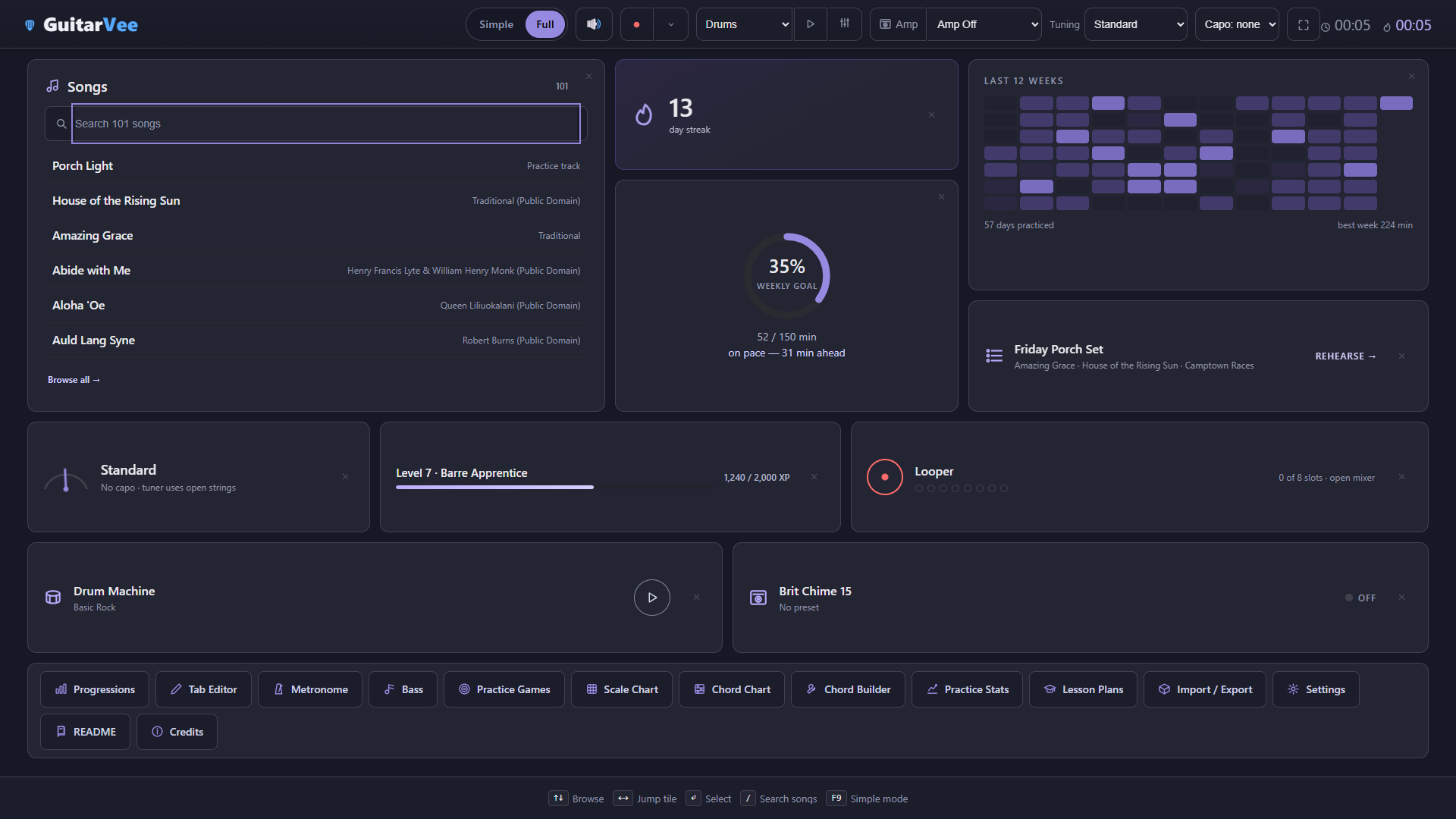
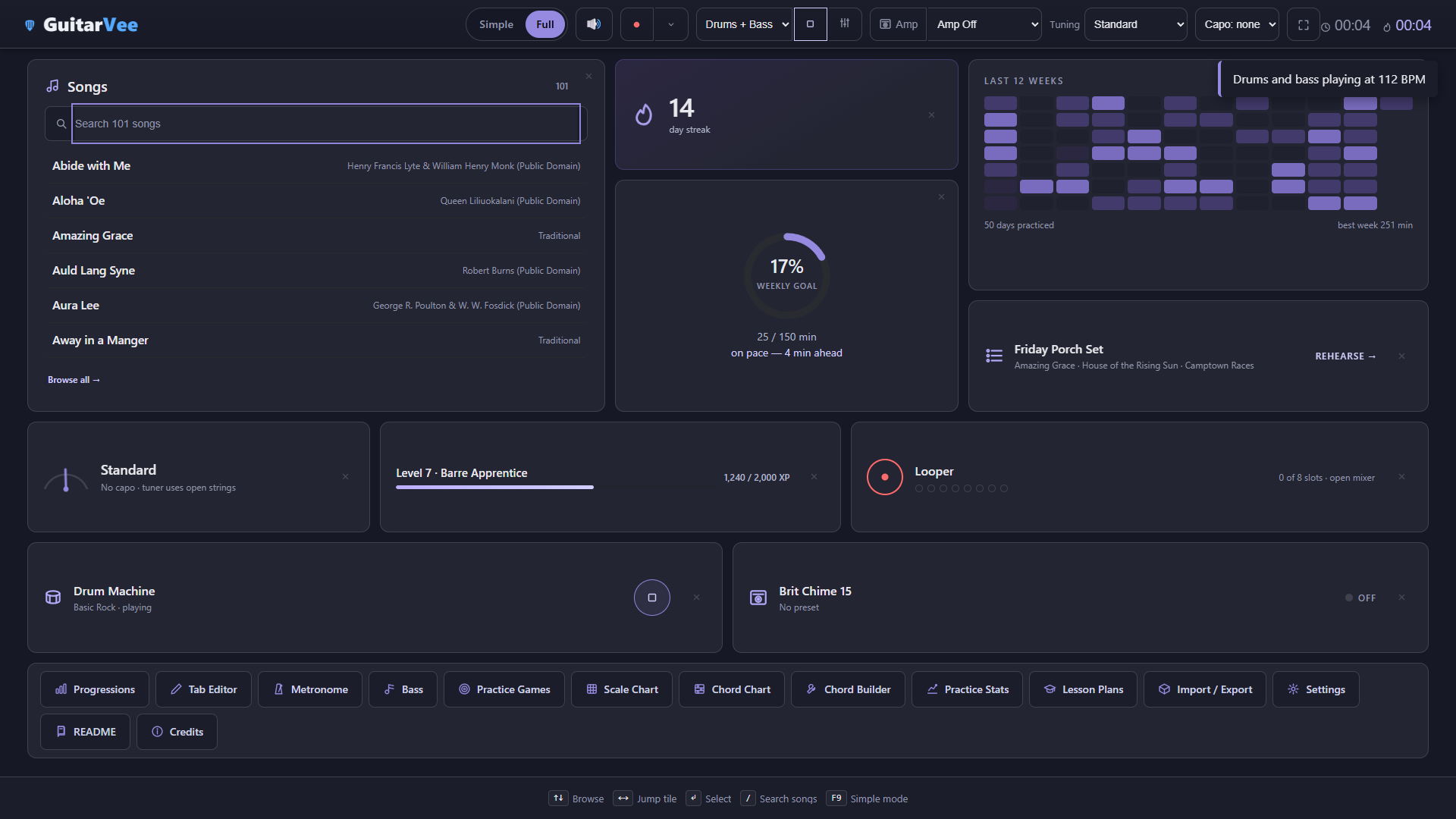
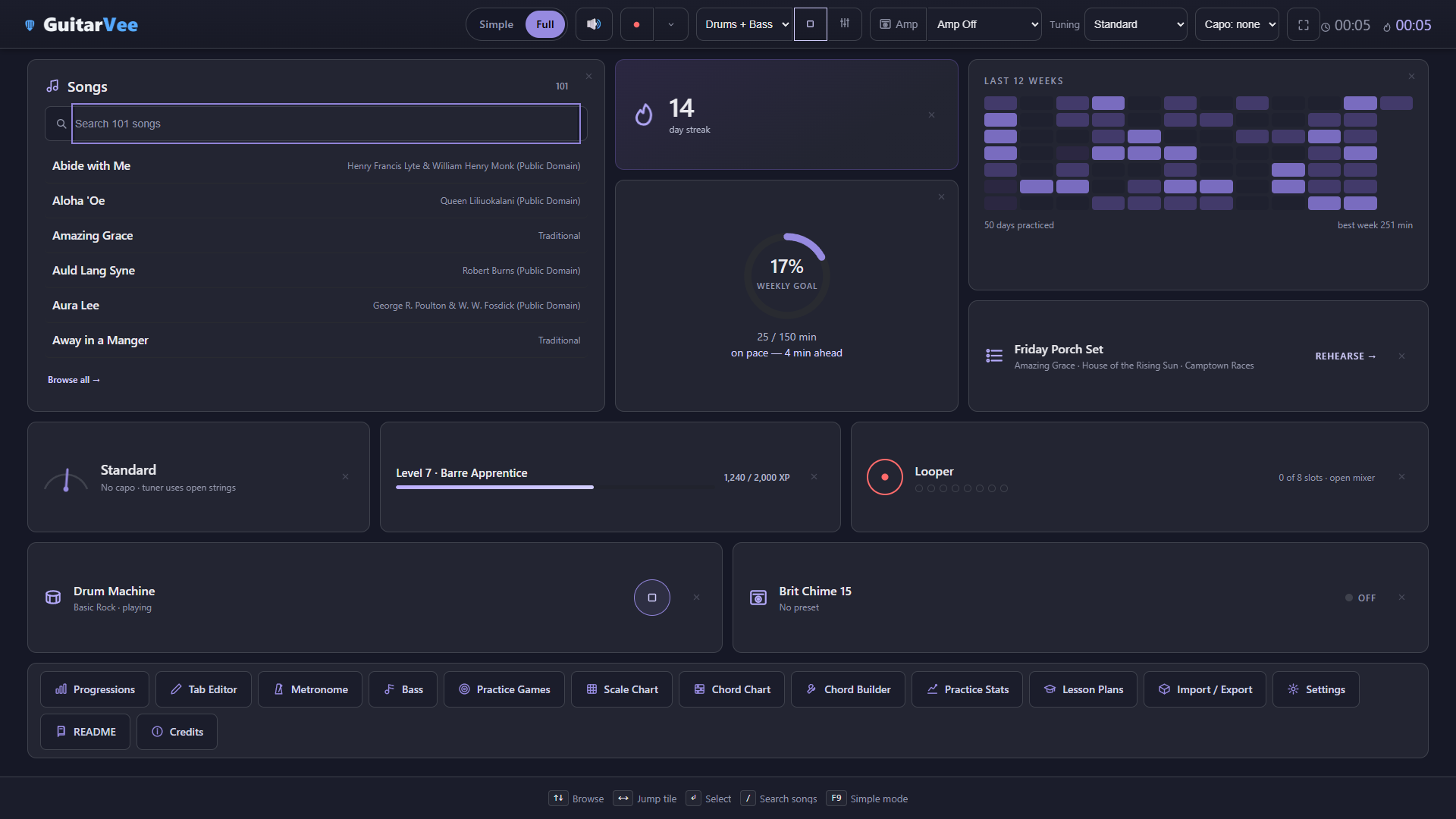
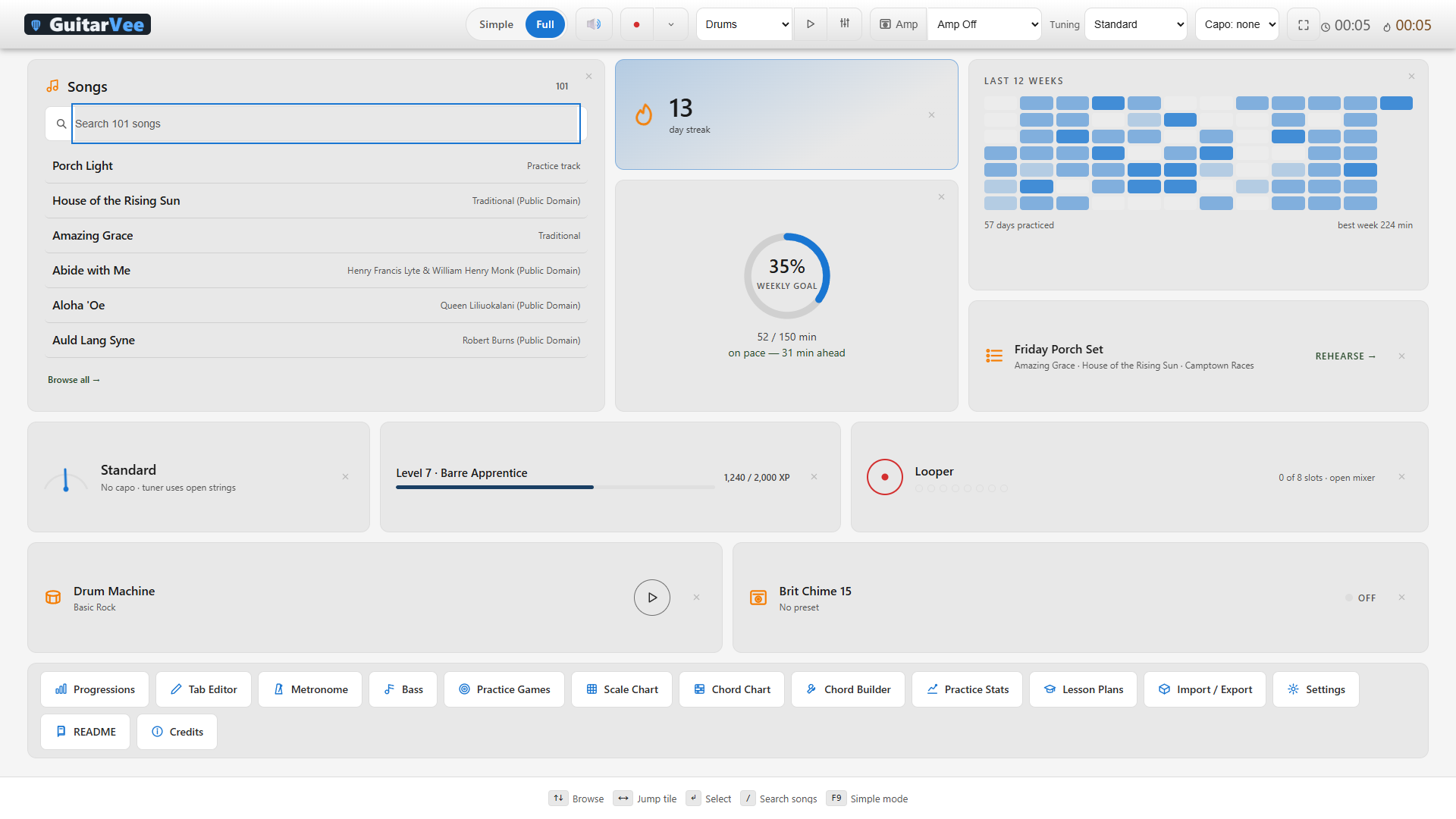
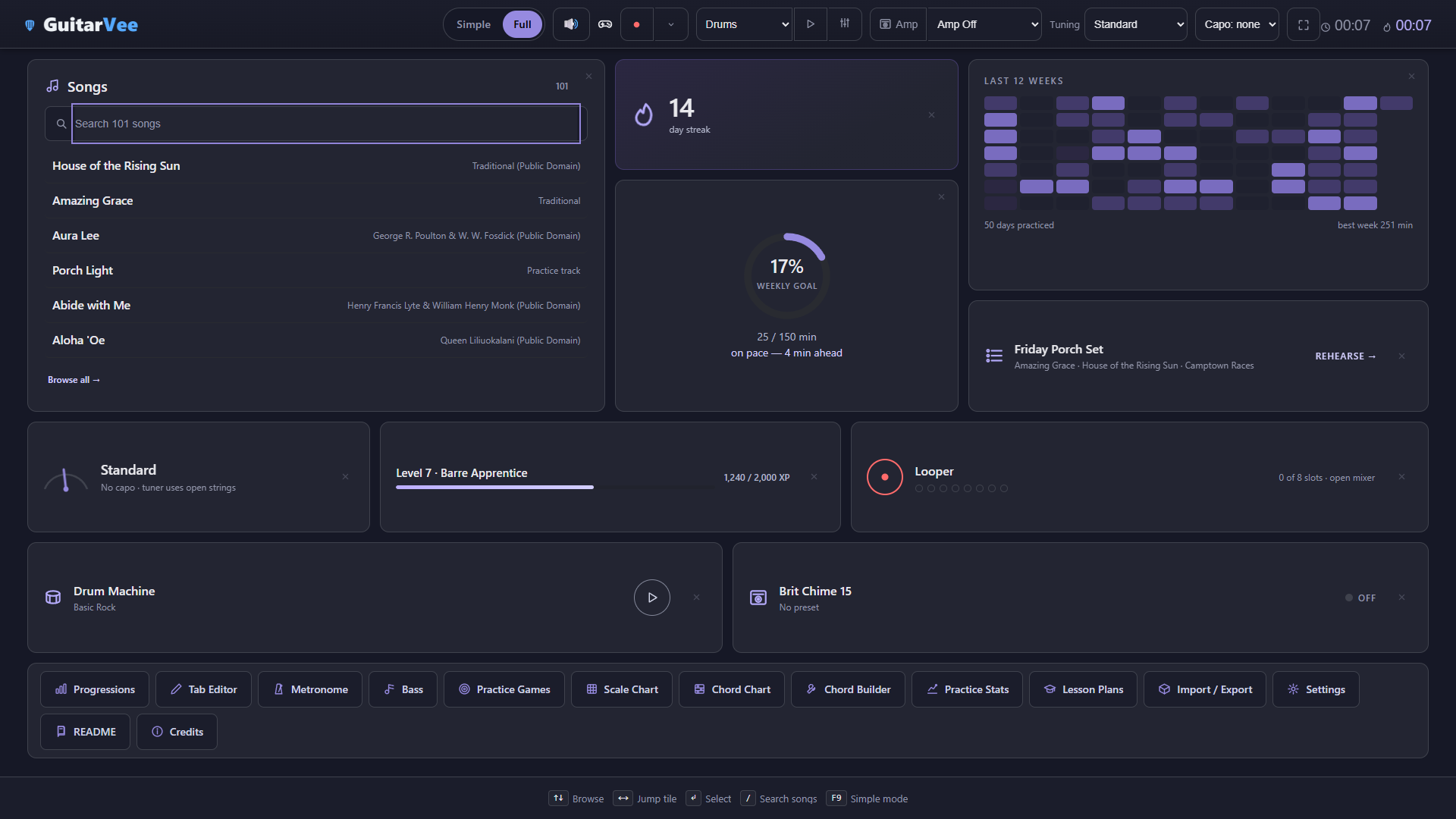
Home is a Scorecard — the streak, the heatmap, the goal ring, the setlist, and every tool one keypress away
12
modeled amps + Custom
100
built-in pedals
150
amp presets and rigs
9 + 7
cabinets + speaker voicings
100
songs included
18
drum patterns
12
bass styles
25
achievements
Get it
The 0.1.0 alpha is out — build b062.
Windows 10 or 11, 64-bit — a portable ZIP of about 3.4 MB, no installer, nothing written outside the folder except your own data. Build b062 shipped on 22 September 2026; every earlier published build, back to the first public build b036, stays on the download page, version-locked. It is an experimental test build and it is not code-signed yet, so Windows will warn you the first time you run it; the download page spells out exactly what it will say and why. The Steam Machine version is experimental and still being worked on; Windows is the full GuitarVee experience.
Built for students and instructors learning guitar.
A practice room, a performer, a rig, and a band — in one app that runs offline. Bass, drums, vocals, and keyboard are next.
The Scorecard
Your practice, kept honest — and kind of addictive.
Every minute you play is logged the moment you play it — and the difference between time open and time actually playing is tracked too, so the numbers mean something. Streaks build, the heatmap deepens, the weekly ring closes, and sections you finish bank XP toward levels with names worth earning.
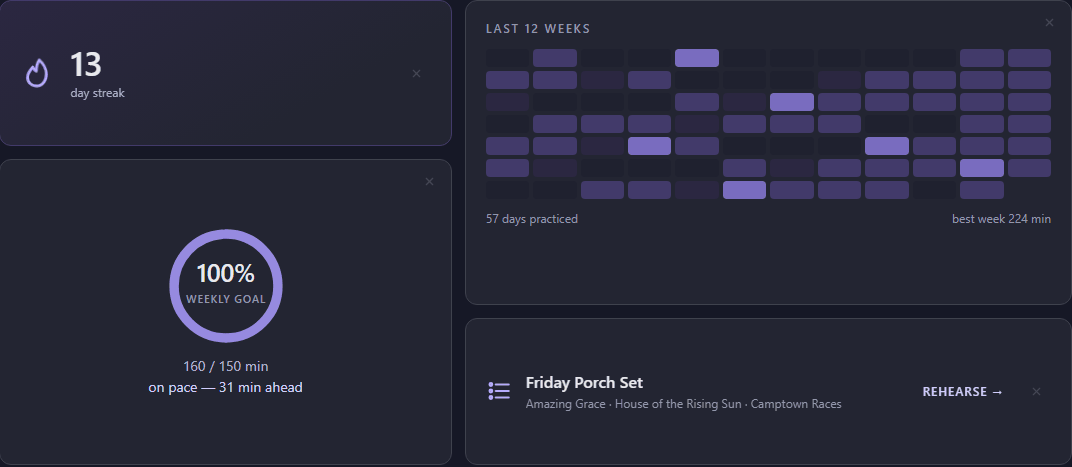
The tiles keep score: streak, twelve weeks of heat, the goal ring, and the next set
A streak that survives real life — any honest practice keeps the flame lit
Twelve weeks of heat — light days, heavy days, and the Saturdays you went long
A weekly goal ring that knows the pace — "on pace, 50 min ahead" beats a guilt trip
Levels with titles — bank XP from finished sections and climb from Fresh Strings toward Barre Apprentice and beyond
Everything is live — the tuner, amp, looper, and drum tiles on the home screen are the real controls, not shortcuts
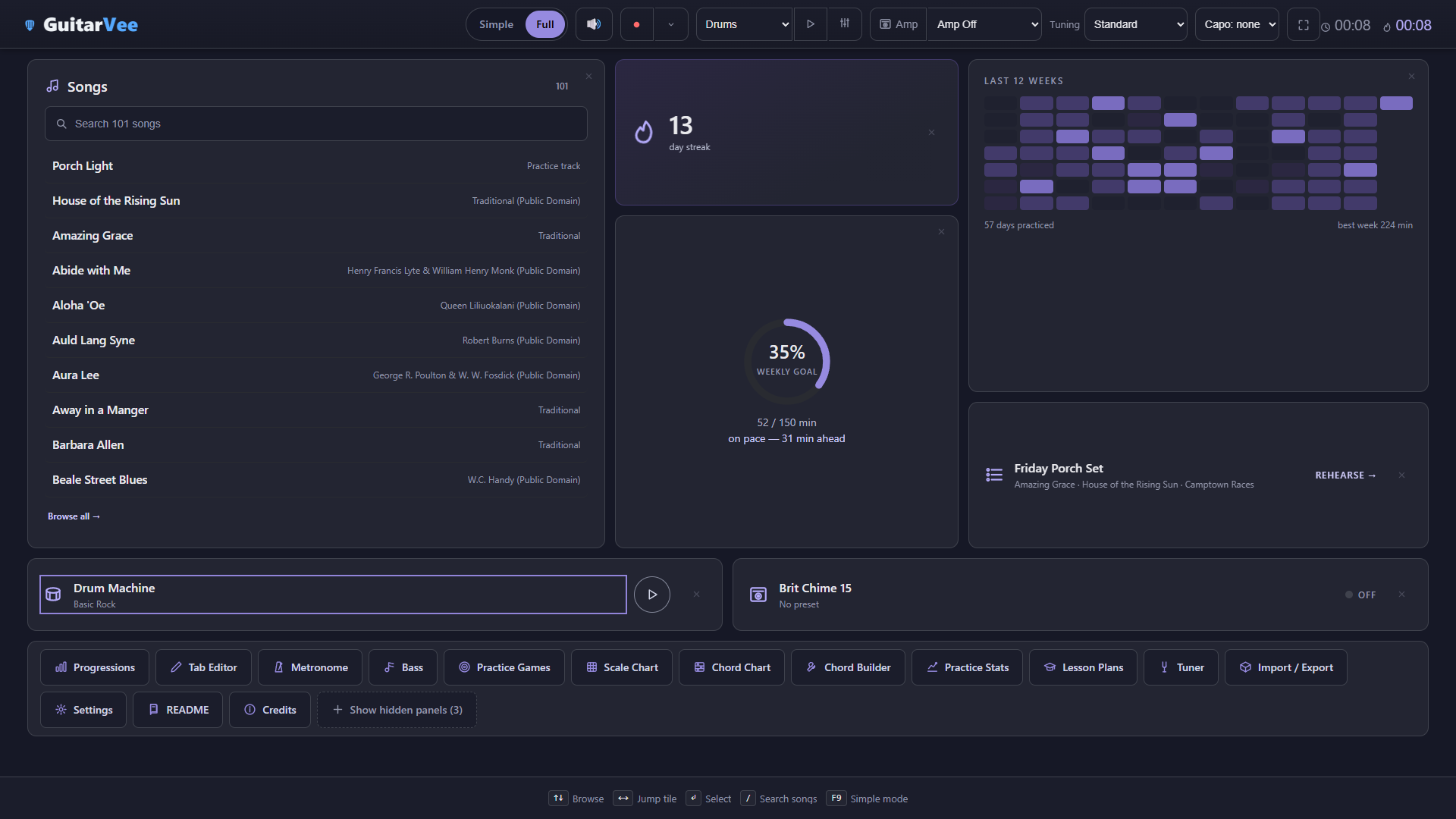
Fold away what you don't use — every panel has a small ×; the grid re-packs around the gap and a chip brings the panels back
A home you can fold
Press the × on any panel and it is gone — not greyed out, not an empty rectangle; the grid re-packs so the screen holds only what you use
Nothing becomes unreachable — anything a folded tile was the only route to comes back as a quick-launch chip
"Show hidden panels (3)" at the end of the strip brings everything back, and what you fold is remembered for next time
Three panels folded: the grid re-packs and a "Show hidden panels (3)" chip waits at the end of the strip
Perform
Play the song. Tick the section. Bank the XP.
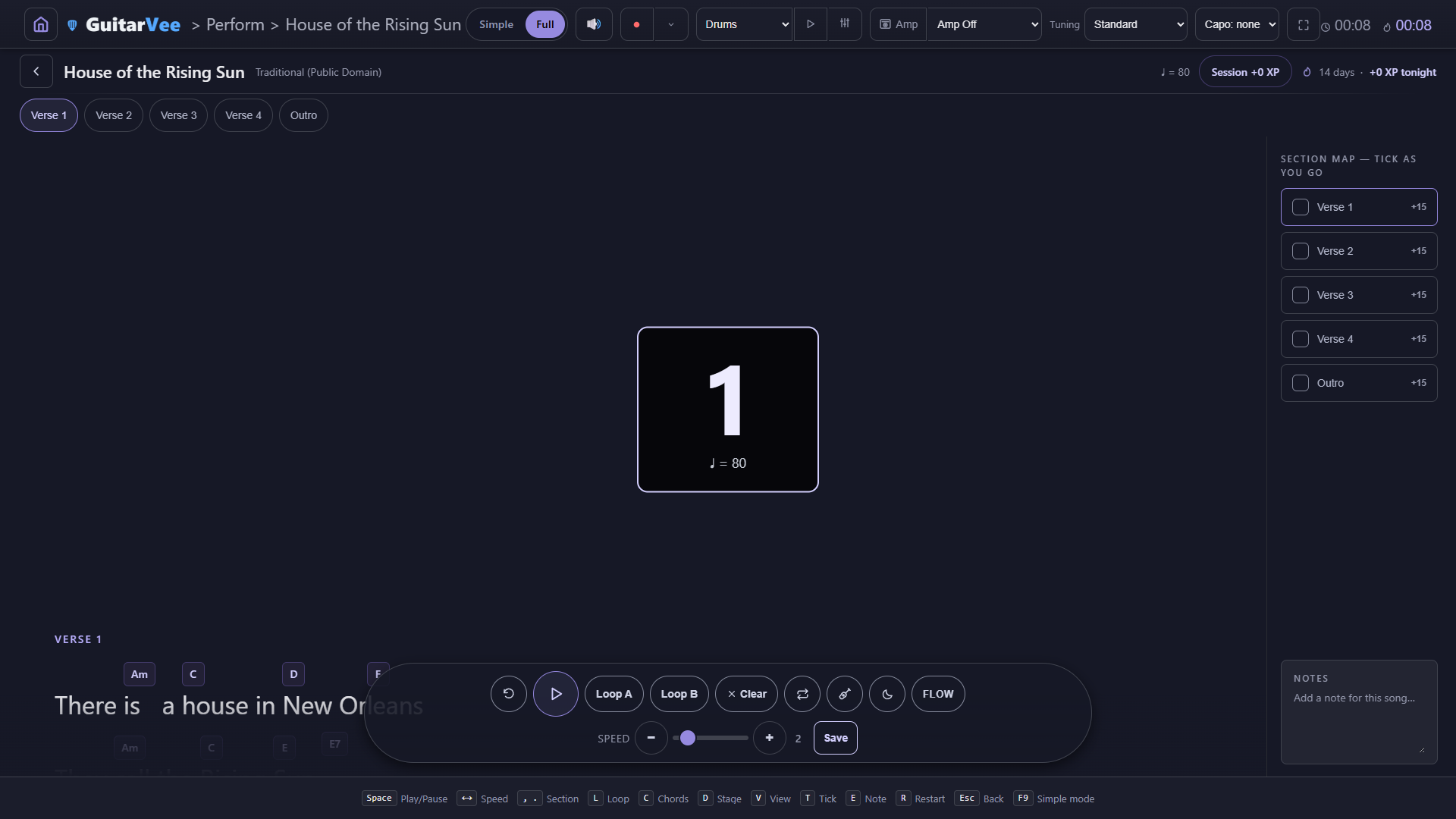
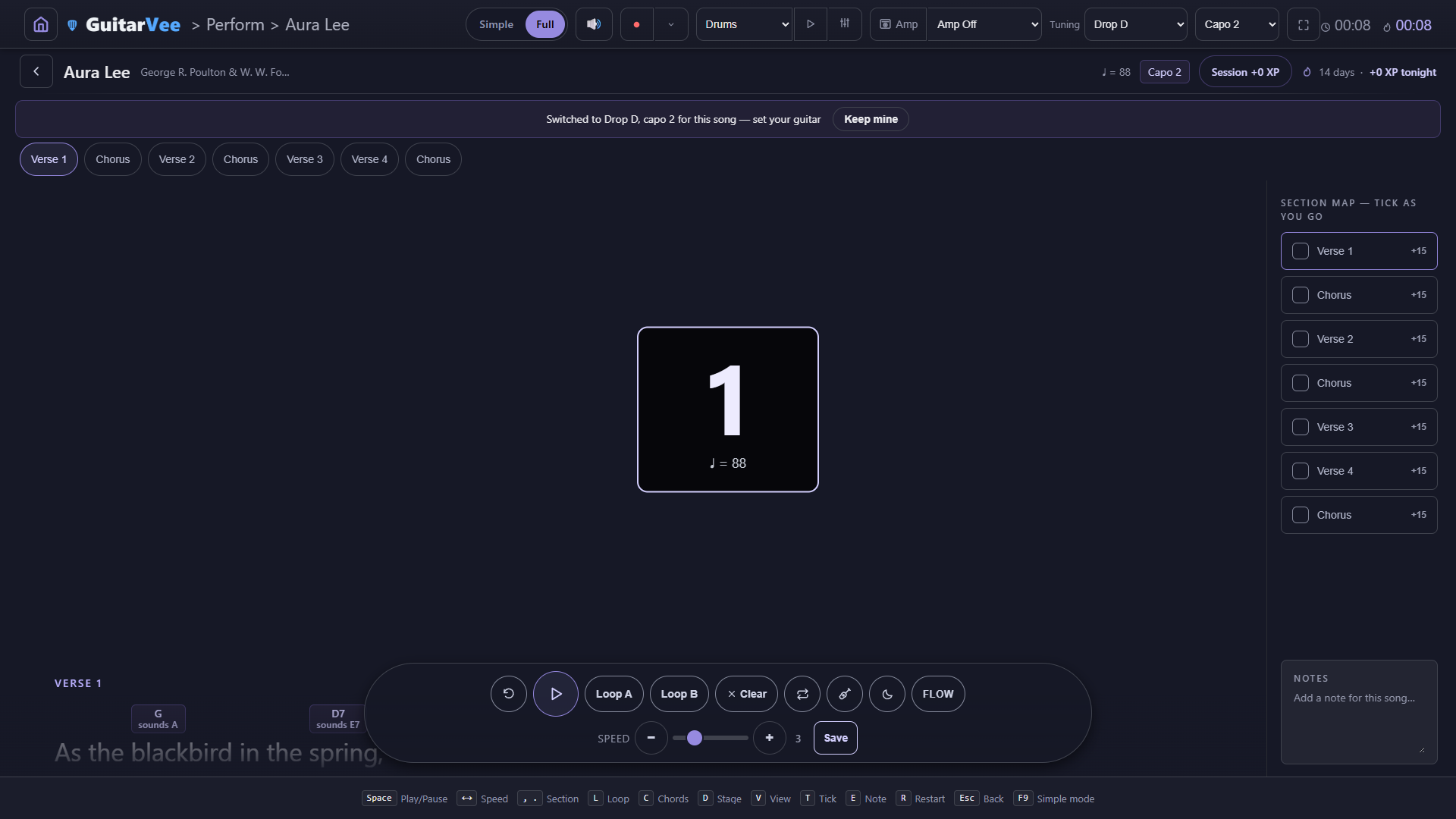
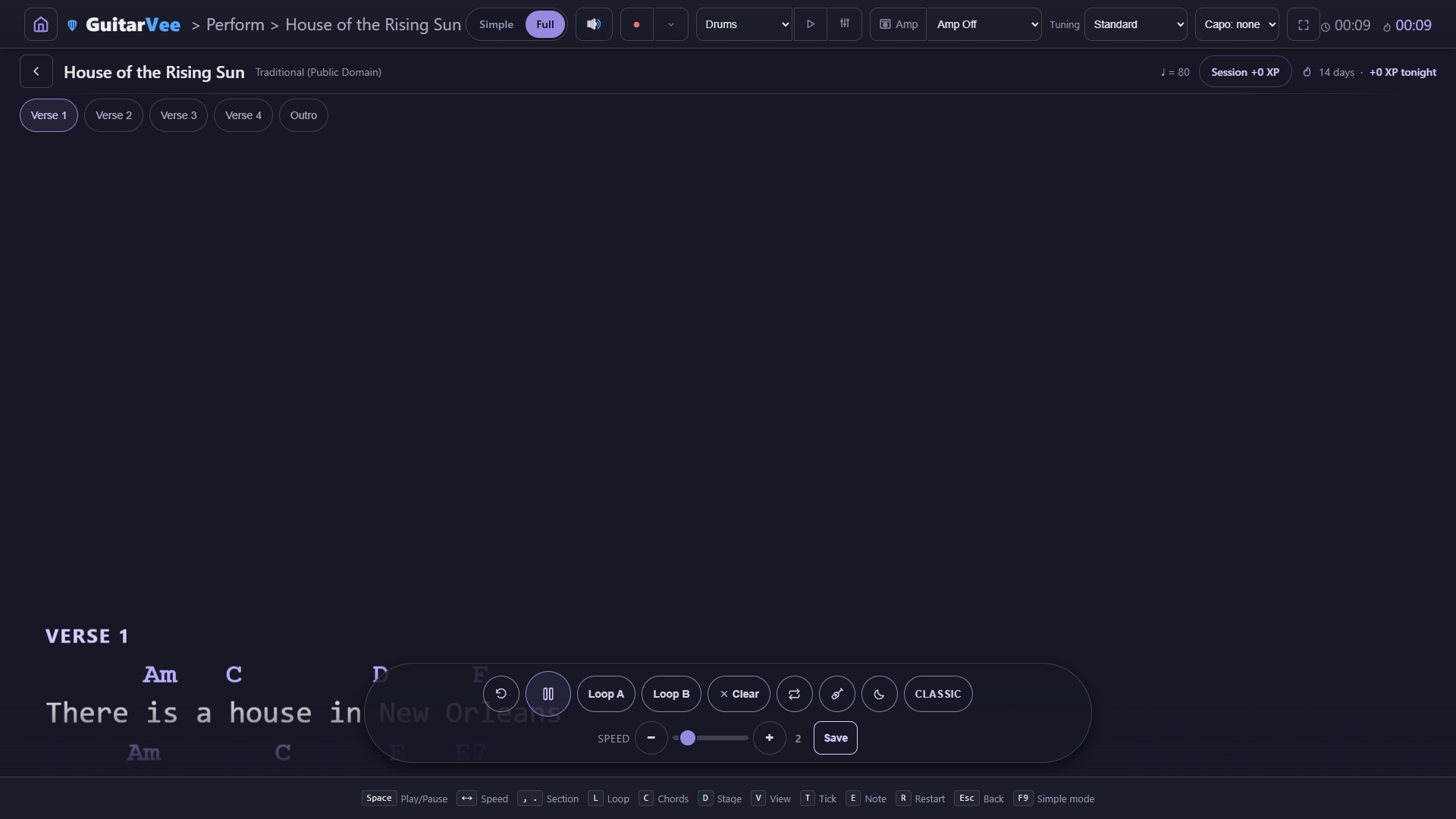
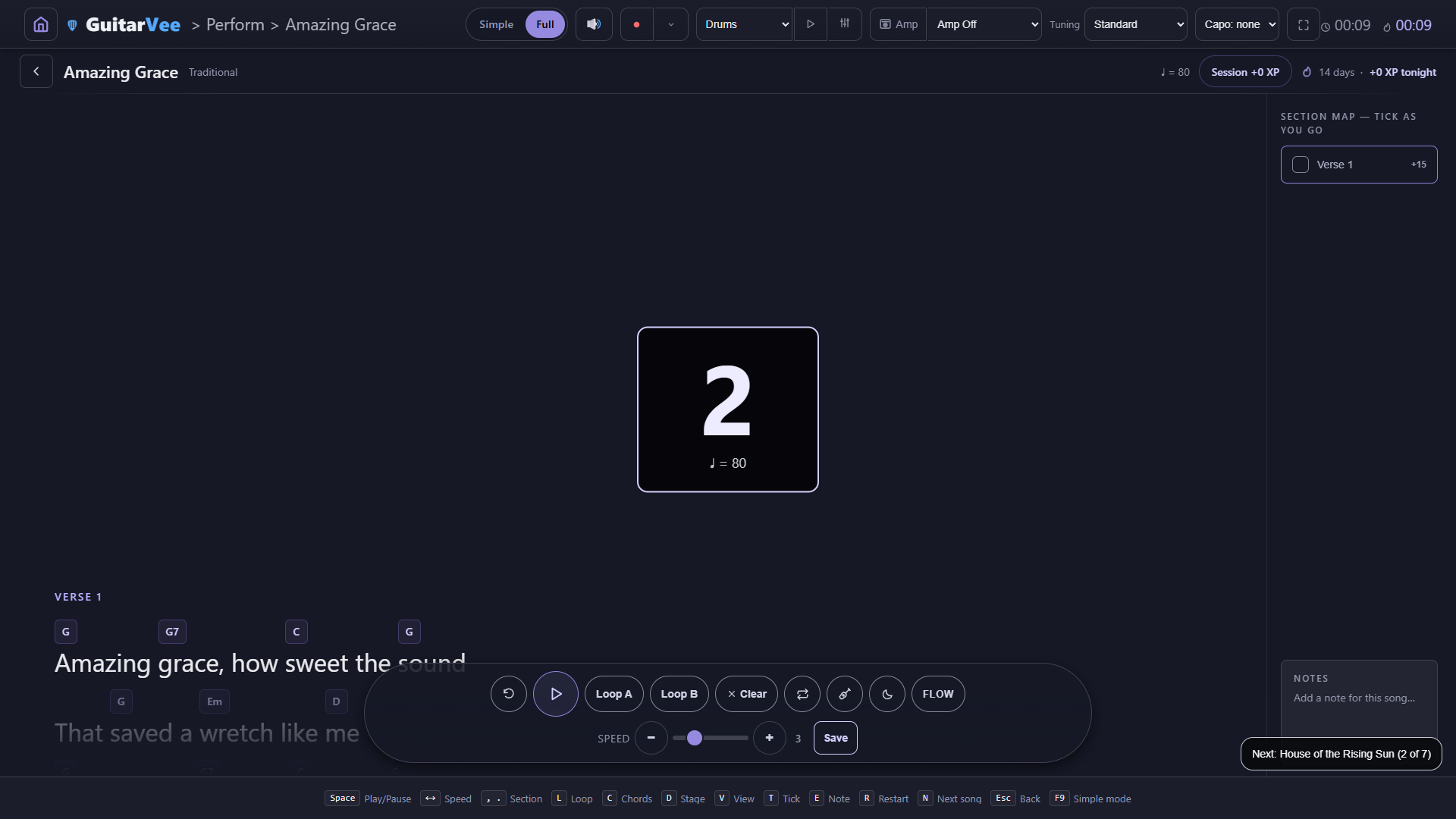
The performer keeps the chrome out of the way — chord chips ride the syllables they belong to, the sheet scrolls at your speed, and the Section Map sits on the right like a checklist. Finish a verse, tick it, and the XP lands in your session. A notes card remembers what tonight-you wants tomorrow-you to fix.
The count-in: one bar of clicks, then the sheet scrolls — five boxes on the Section Map waiting to be ticked, and a notes card for next time
Section Map — every verse, chorus, and outro is a box to tick; each tick banks XP into the session
Per-song notes — "watch the A7 pivot" stays with the song, not in your head
Chord chips you can tap — every chip opens its diagram; any tuning, any capo, a solver finds playable shapes
Songs set up your guitar — a chart saved for Drop D, capo 2 switches the header when it opens, with a quiet notice and a Keep mine button if you would rather not
Count-in, section looping, live speed — drill the hard eight bars, then play the song through
Flow or Classic view — proportional lyrics with chips above the words, or chords-over-monospace, one keypress apart
Karaoke and Perform All — one line at a time on a big screen, or a whole setlist back to back
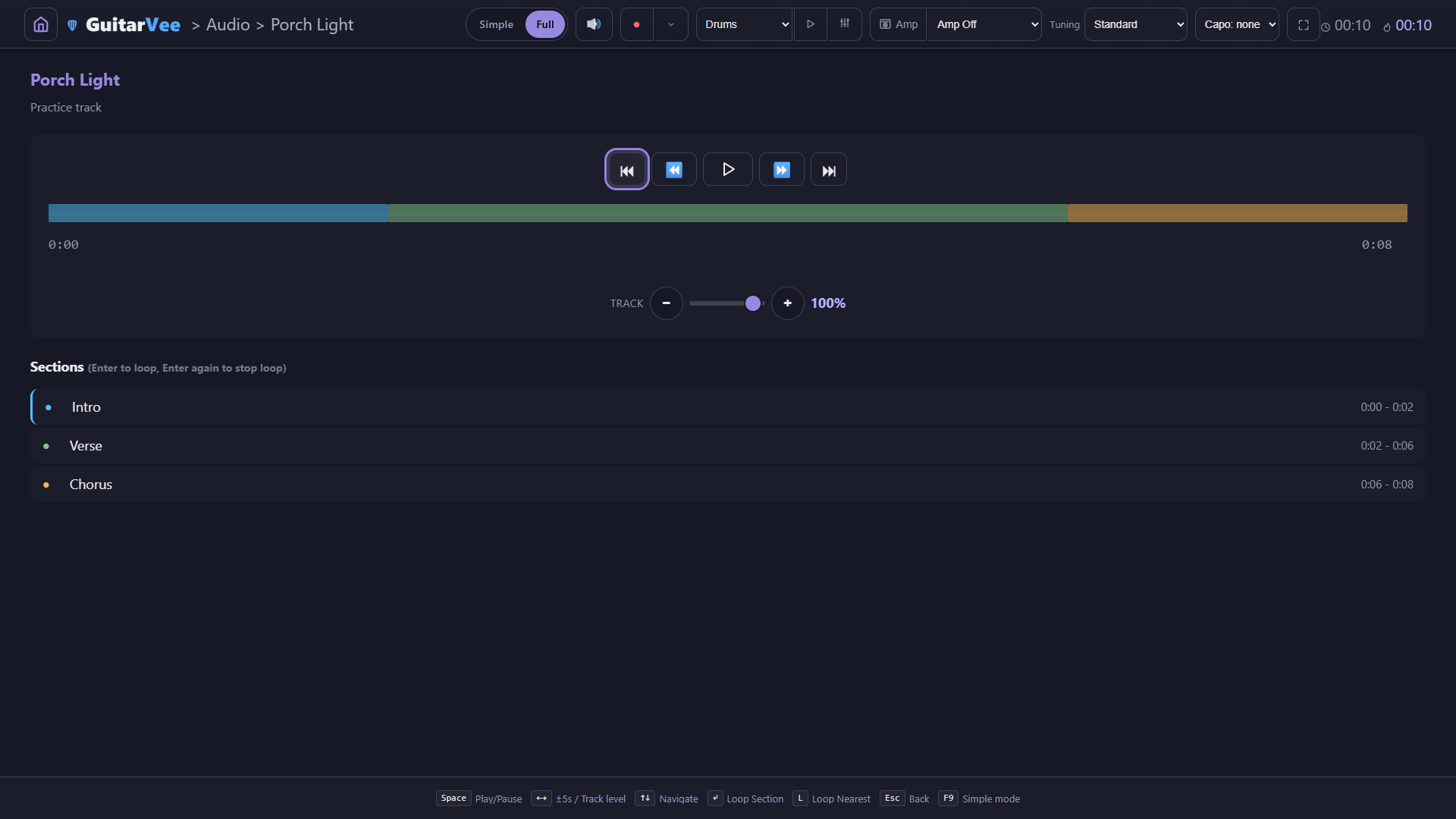
Backing tracks at house level — a song with an audio file gets section markers, section looping, and a Track level that sits the recording beside the band instead of over it
A song saved with its own tuning and capo sets the header for you — "Switched to Drop D, capo 2 for this song — set your guitar", with Keep mine to put your own setup backThe Audio Player: coloured section markers, Enter to loop a section, and the Track level row — 100% is the house level the drums and bass play at
The amp room
The amp comes first. The signal path reads left to right.
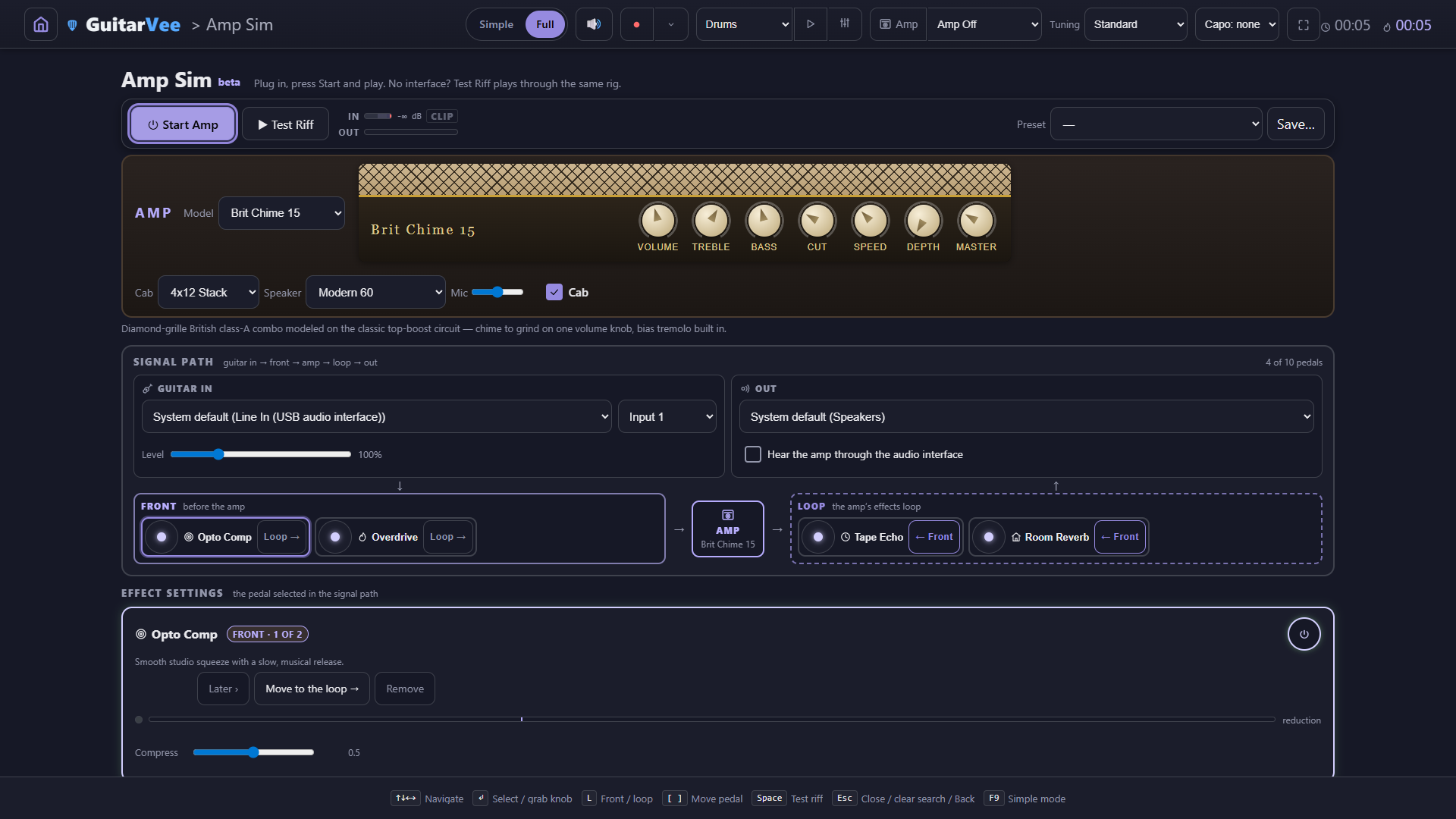
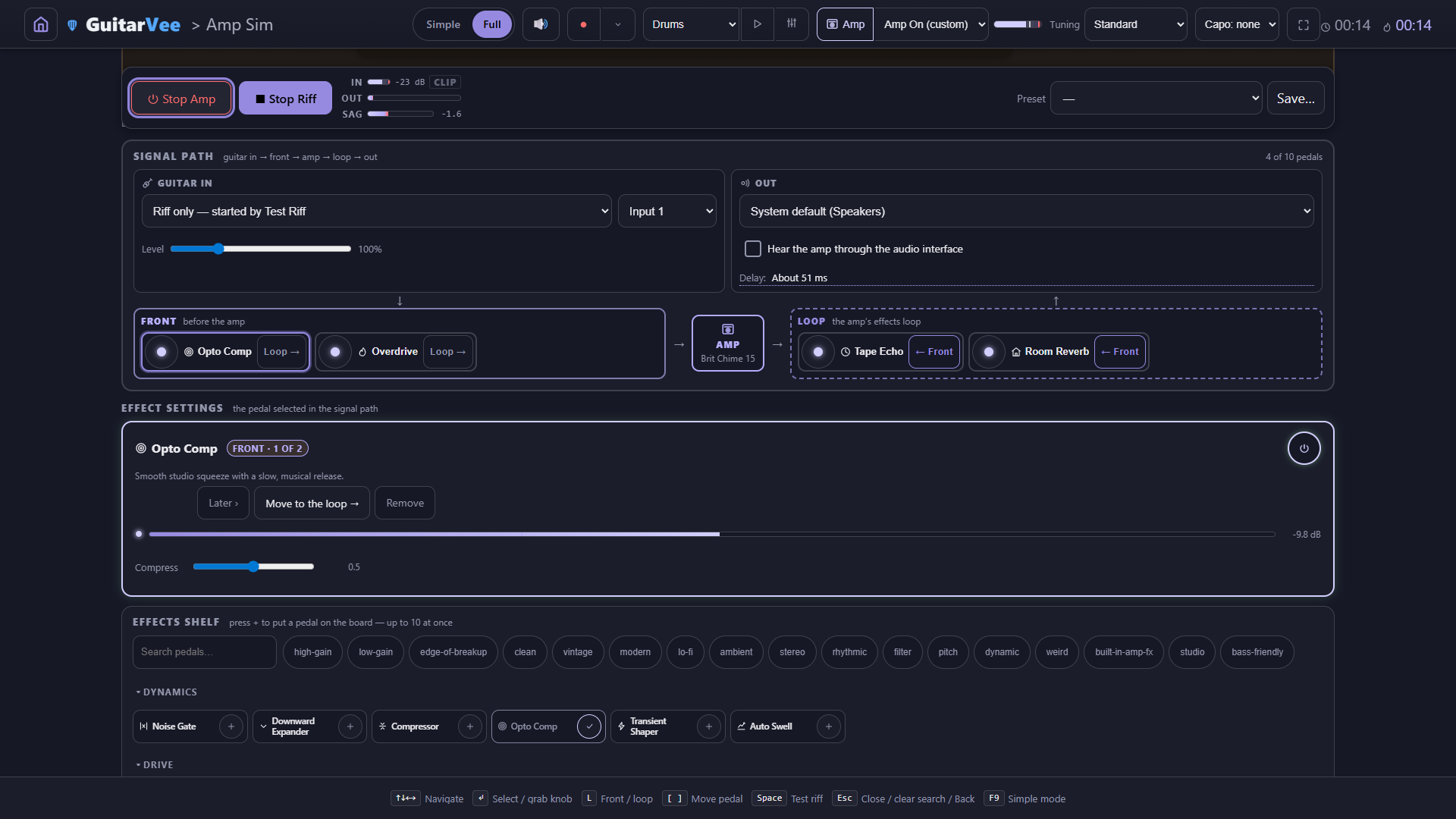
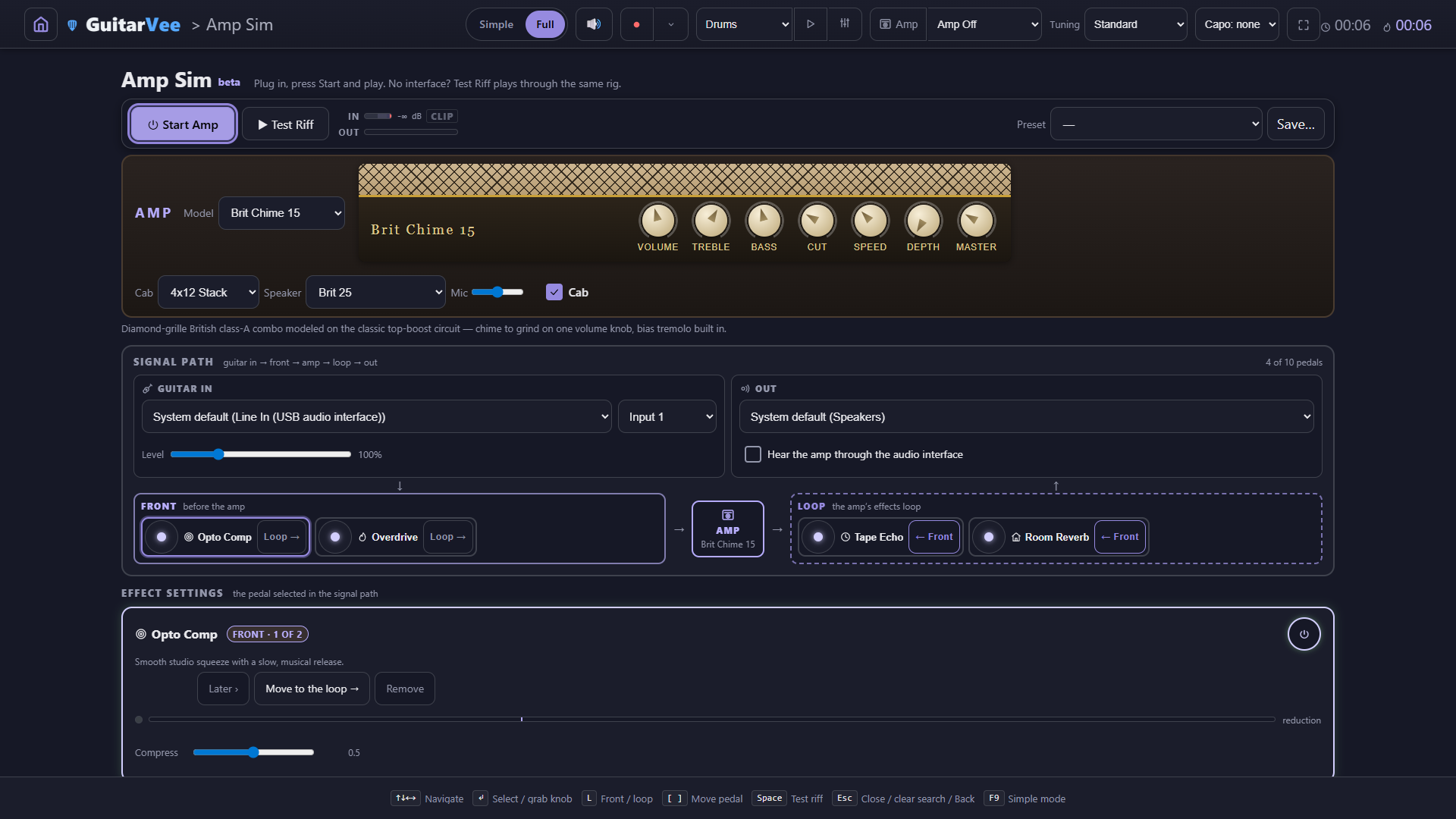
The amp screen opens on the amp: pick a model and its faceplate, cab, speaker and mic sit right under Start Amp and Test Riff. Below it, the signal path — Guitar in, a FRONT lane, the amp, a LOOP lane, Out — then the settings for whichever pedal is selected, and the effects shelf at the bottom. Twelve models, modeled on the classic circuits — tone stacks, tube stages, sag and speaker voicings — each wearing its own faceplate with knobs that turn.
Amp first: model, faceplate, cab / speaker / mic — then the signal path, then the settings for the selected pedal
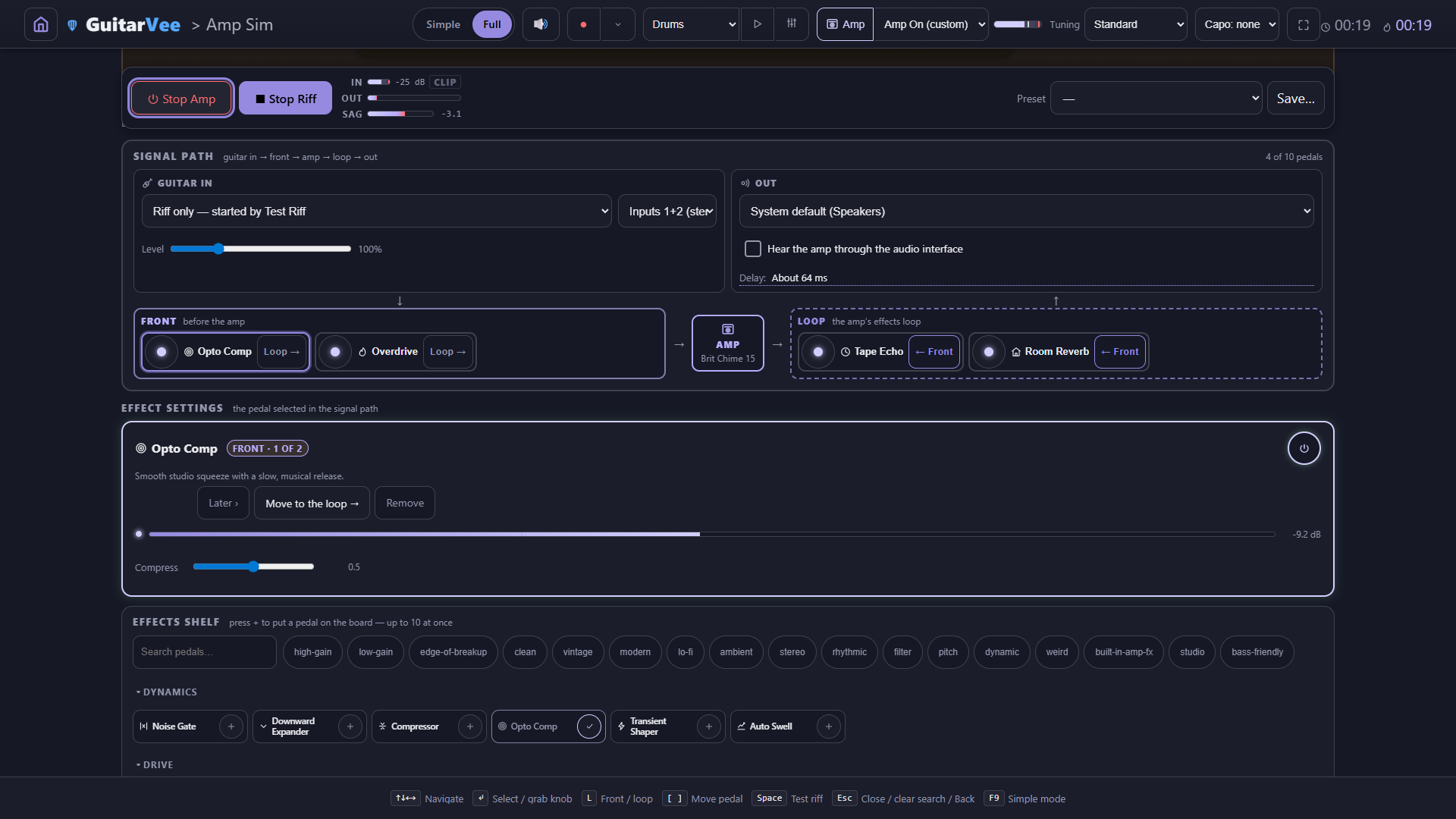
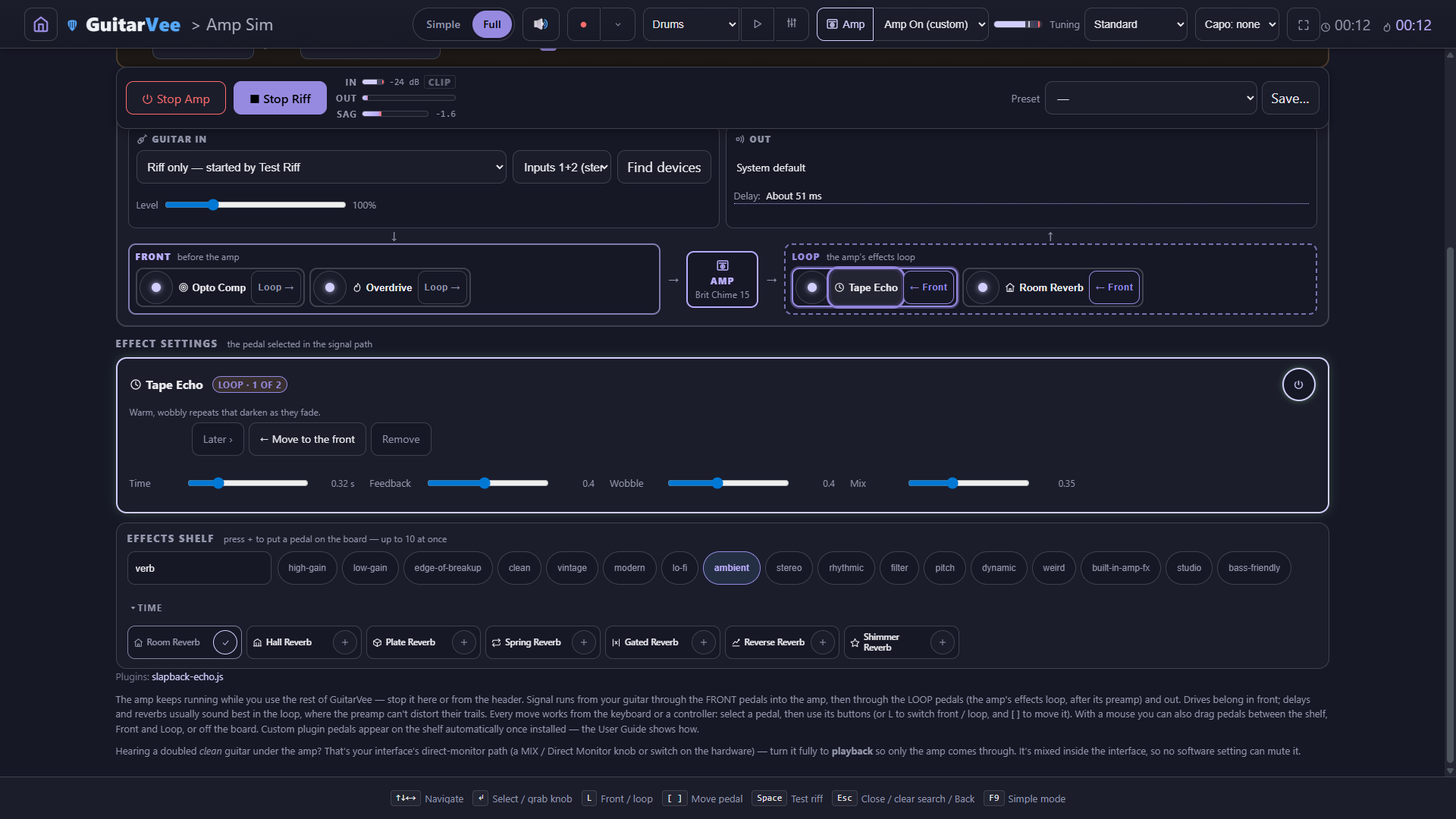
Guitar in and Out, spelled out — pick the input device and its channel (Input 1, or Inputs 1+2 as a stereo pair), pick the output, and choose whether to hear the amp through the audio interface
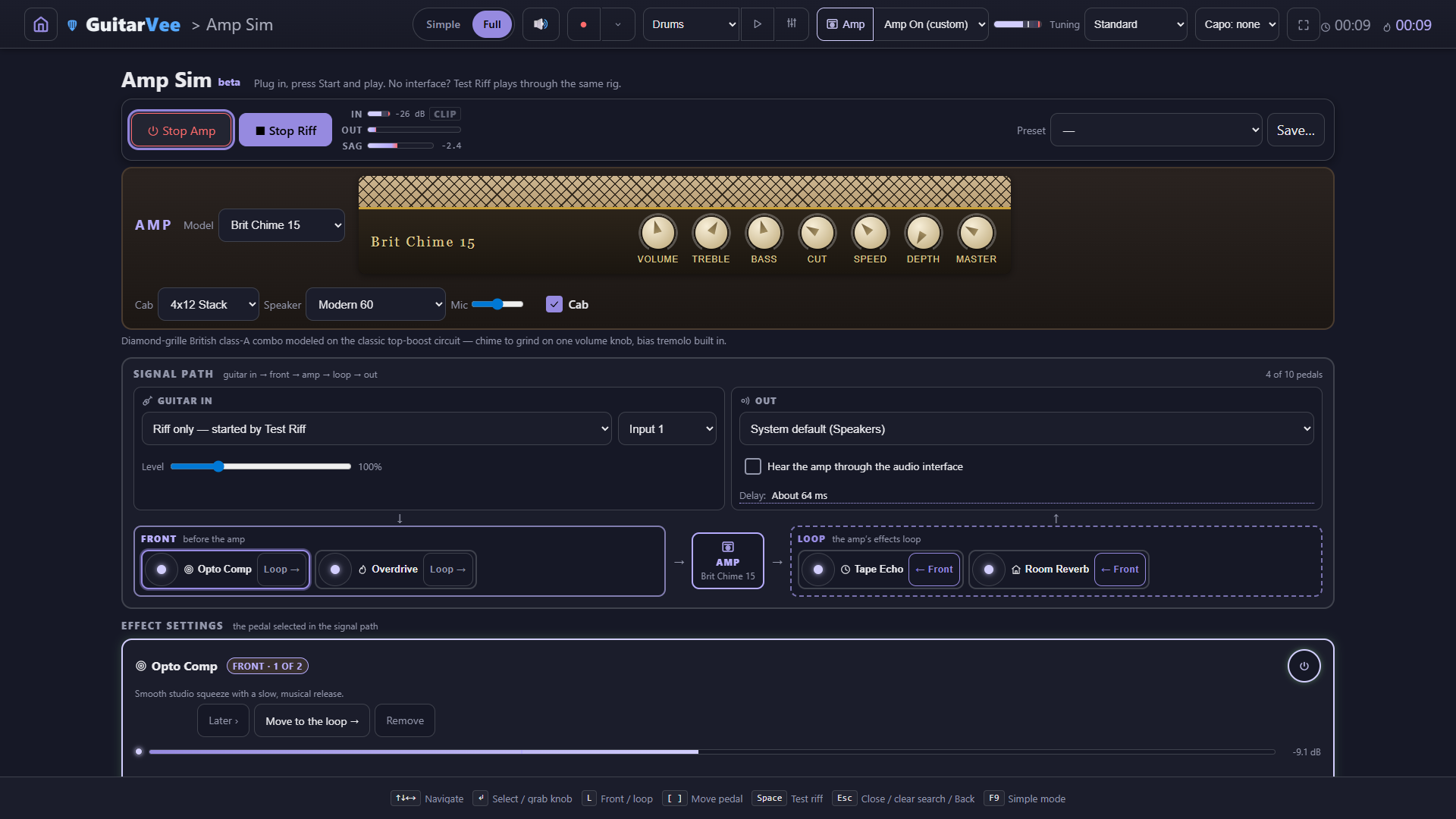
An honest delay readout — while the amp runs, the Out box reports what the system currently measures: "Delay: About 51 ms"
FRONT and LOOP as two lanes — drives and compressors before the amp, delays and reverbs in the effects loop where their trails stay clean; every pedal has a button to the other lane
Effect settings in one place — the selected pedal's power switch, its knobs, Earlier / Later, Move to the loop, Remove
Honest metering — an input sweet spot, a latching CLIP lamp, and a SAG meter that breathes with the power section
No interface? No problem — "No input (riff only)" and the Test Riff run the whole chain, meters and all
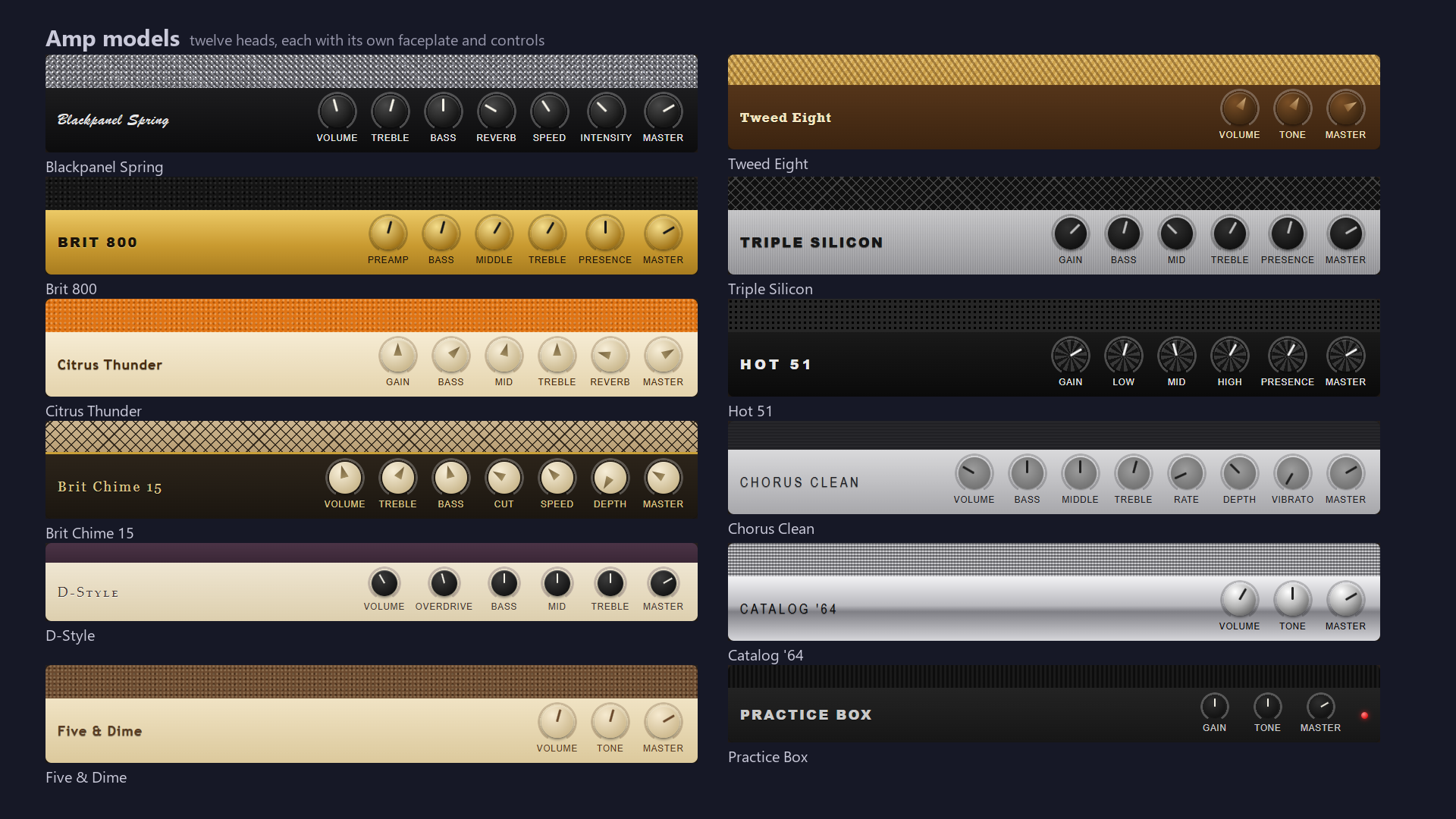
The twelve — every faceplate rendered live by the app, knobs and all
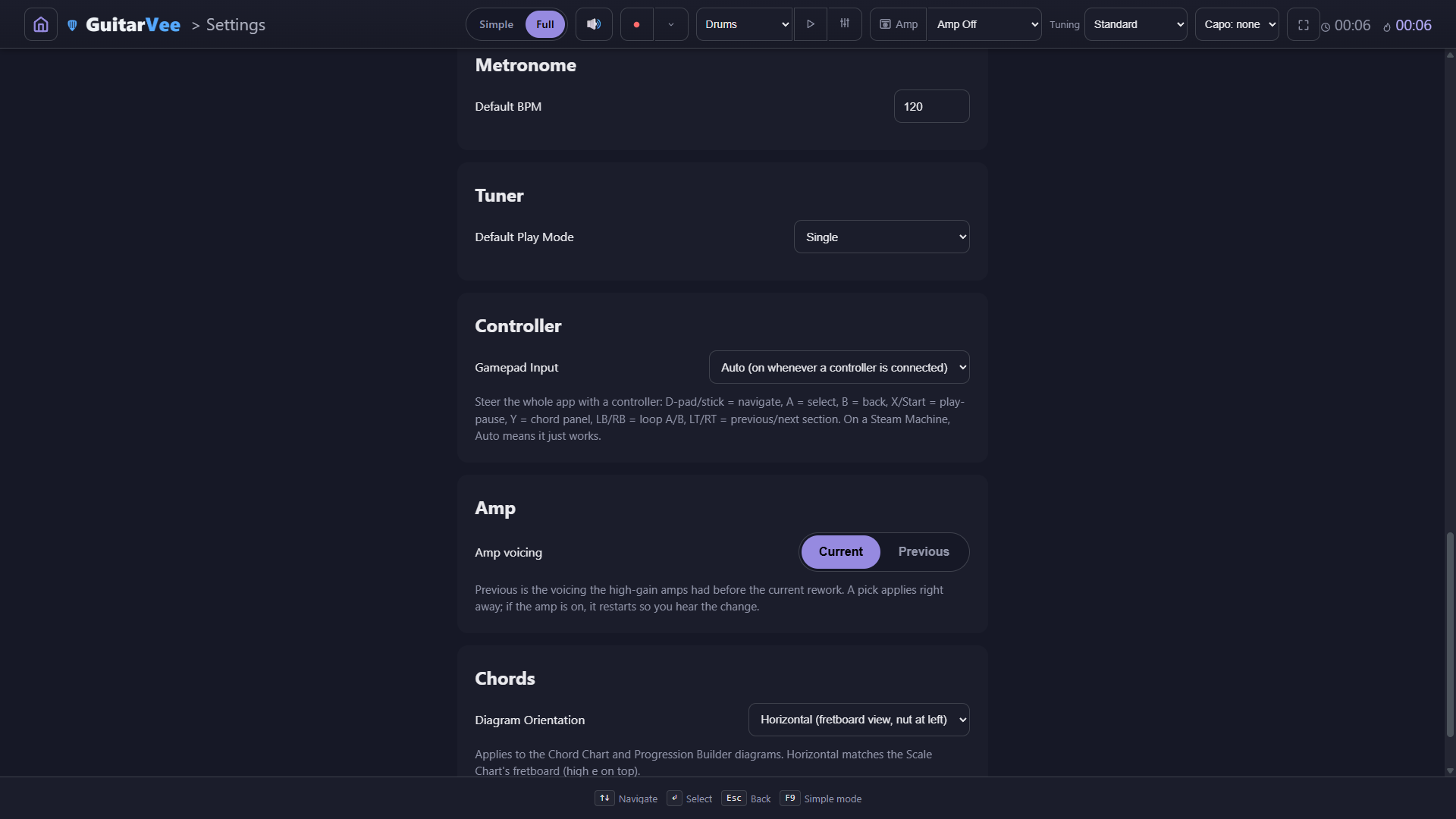
Running: Guitar in, Out with the interface switch, and "Delay: About 51 ms" — measured, not promisedSettings → Amp: the voicing switch — Current, or the Previous voicing the high-gain amps had before the rework; a pick applies at once
Blackpanel SpringTweed EightBrit 800Triple SiliconCitrus ThunderHot 51Brit Chime 15Chorus CleanD-StyleCatalog '64Five & DimePractice Box+ the original Custom head
The pedal wall
One hundred pedals. Two lanes. Find yours in two keystrokes.
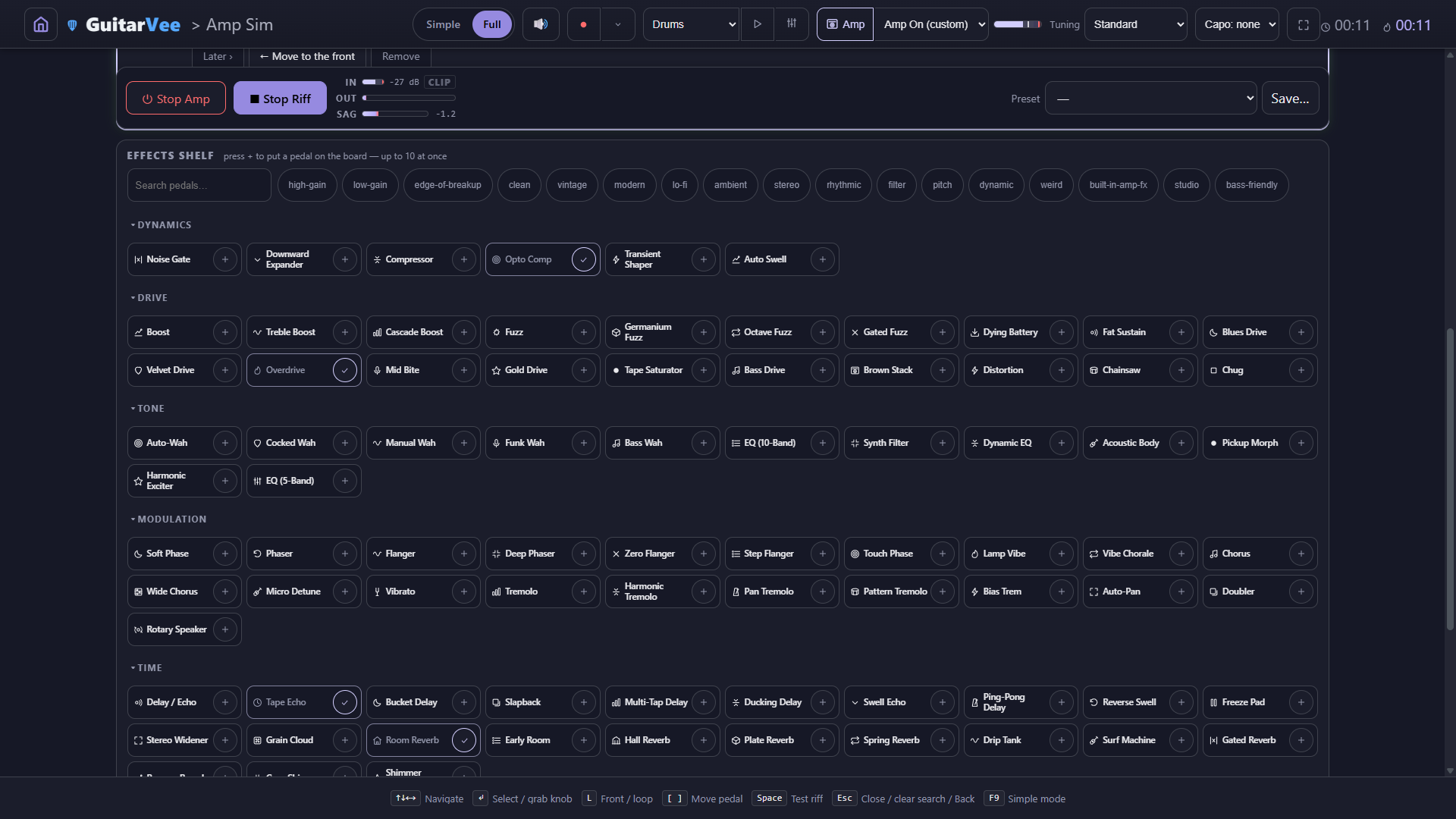
Every pedal on the board sits in the FRONT lane (before the amp) or the LOOP lane (the amp's effects loop) — up to ten at once, in any order, each with a button that moves it across. The shelf underneath holds all hundred, grouped by family. Type into the live search or tap a tag chip — high-gain, vintage, ambient, lo-fi, bass-friendly — and the shelf narrows as you type. Every drive is loudness-neutral, so gain knobs add dirt, never volume.
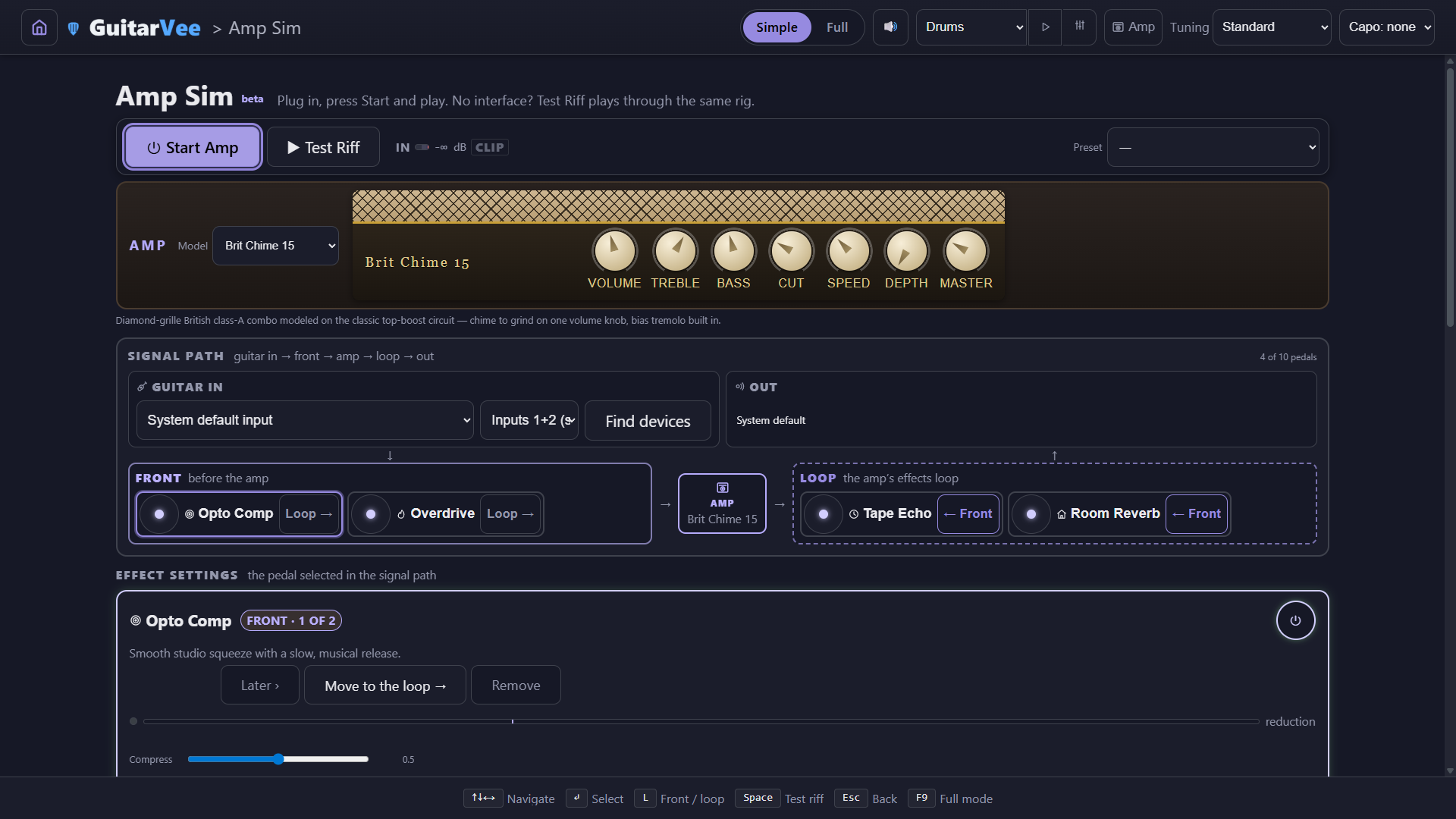
Two lanes: Opto Comp and Overdrive in FRONT, Tape Echo and Room Reverb in the LOOP — each pedal one button from the other lane
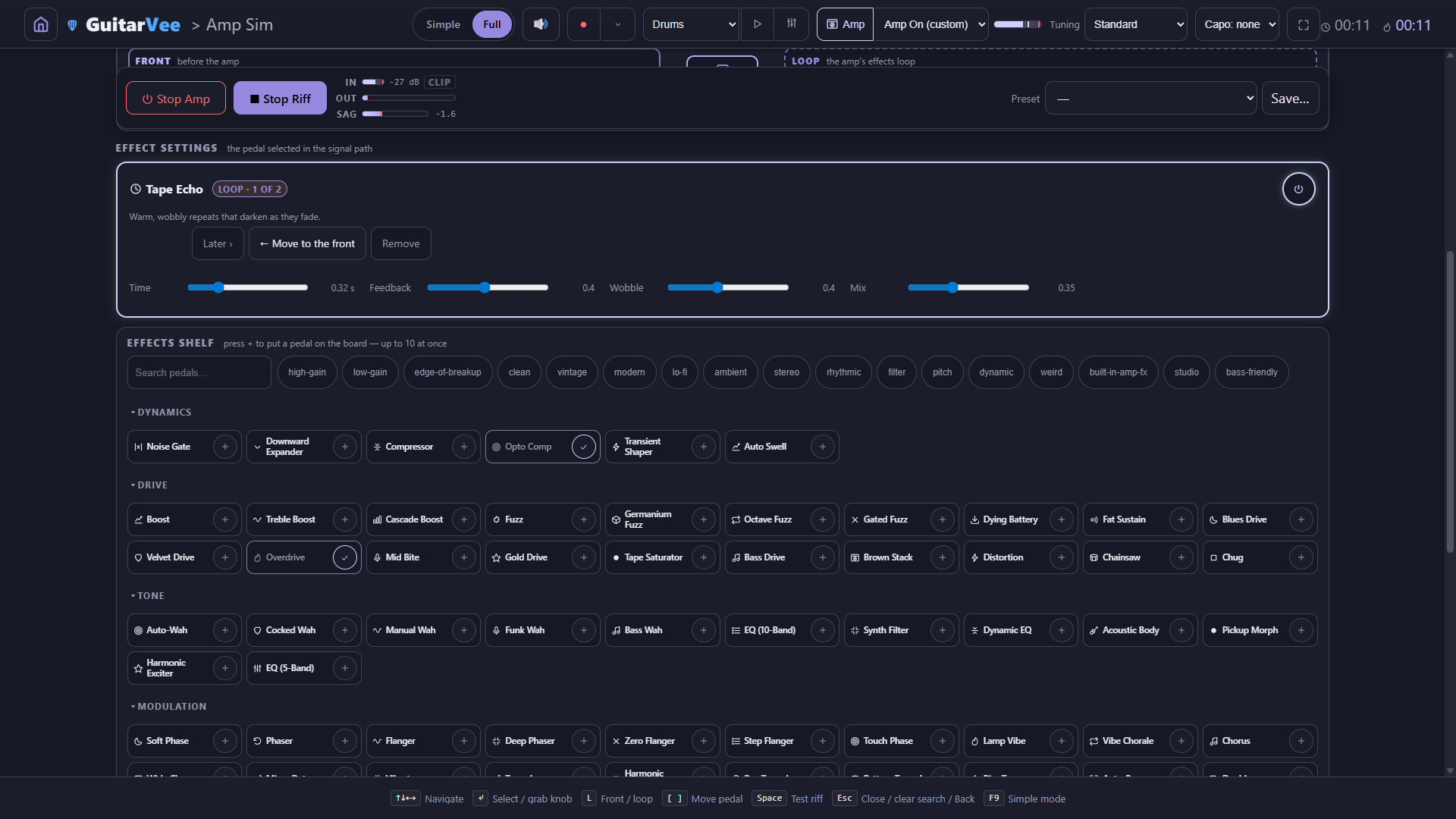
Effect settings for the selected pedal — Tape Echo, LOOP 1 of 2: power, Later, Move to the front, Remove, and its Time / Feedback / Wobble / Mix knobsThe shelf: a hundred pedals by family, the search box, and seventeen tag chips — press + to put one on the board
Drive ×20 — boosts to buzzsaw, five fuzz flavors (germanium, octave, gated, dying-battery), tape saturation, gated modern chugTime ×23 — slapback to ping-pong, multi-tap and ducking delays; room, plate, drip tank, surf machine, cave shimmerModulation ×21 — phasers, three flangers, lamp vibe, wide chorus, micro detune, five tremolos, rotary, doublerWeird ×18 — ring mods, bit crusher, vinyl, talk tube, vowel drone, tape stop, dive bomb, and Animoo, the pedal that makes your guitar sing vowelsTone ×12 — five wahs, 5- and 10-band EQs, dynamic EQ, acoustic body, pickup morph, harmonic exciterDynamics ×6 — a gate that truly mutes, two compressors, downward expander, transient shaper, auto swell
The band
And there's a band inside.
Set the chords and GuitarVee writes a bass line a real player would play — twelve styles from shuffle and walking to reggae one-drop and a metal gallop. Up top, pick Drums or Drums + Bass and press Play: a groove with nothing to set up, and a button beside it that opens the Drum Machine or the Progression Builder. Every drum and bass loop in the app is one sequence on one clock, at one tempo: press Play in the Progression Builder while the groove runs and your chords come in on the next bar, with one bass line following them, like a band taking a new tune on the one.
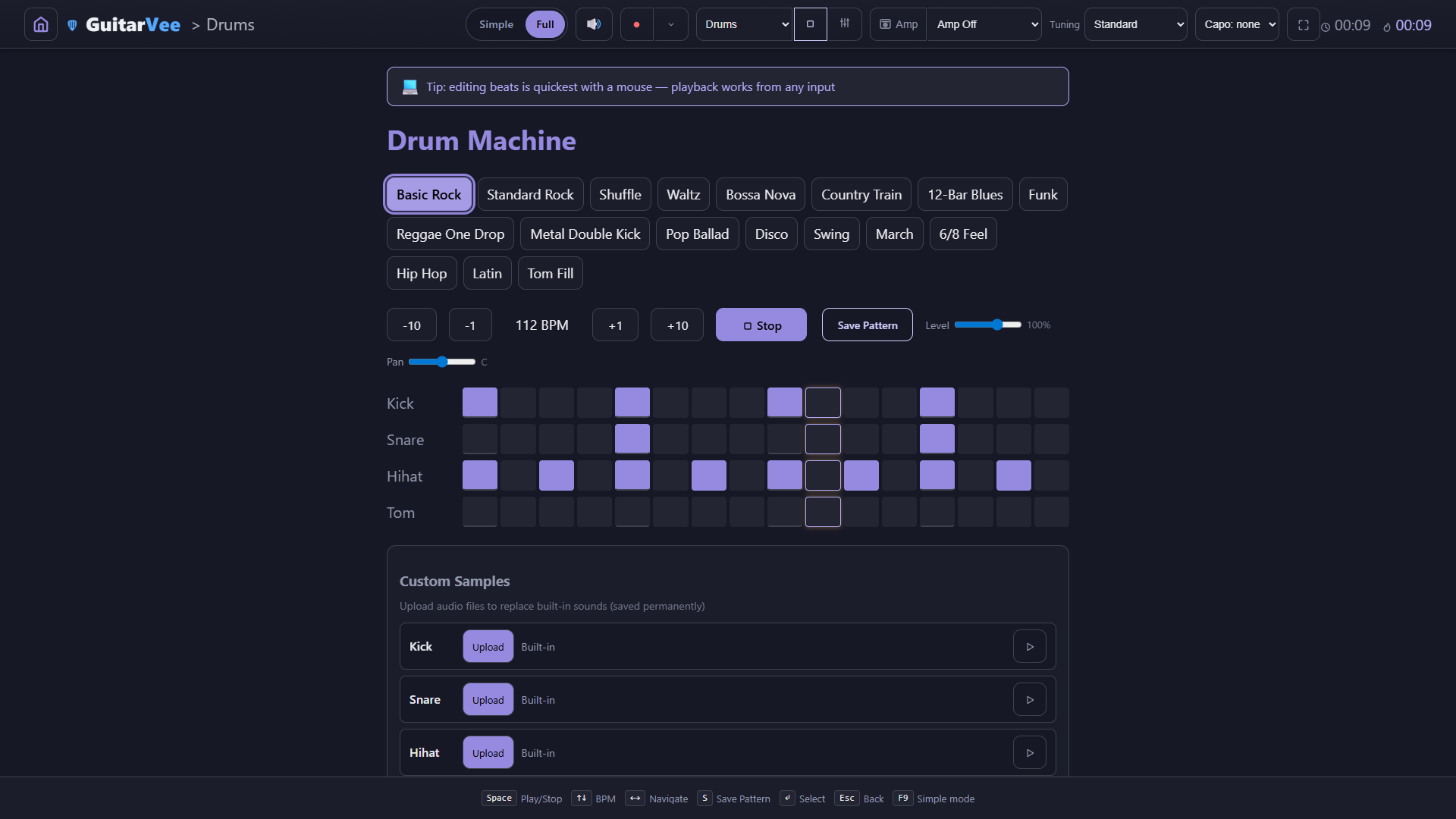
18 drum patterns — rock to bossa to 6/8, with your own samples on any channel
Drums or Drums + Bass, one press — they start together on the first beat and keep playing on every page; Stop anywhere stops the band
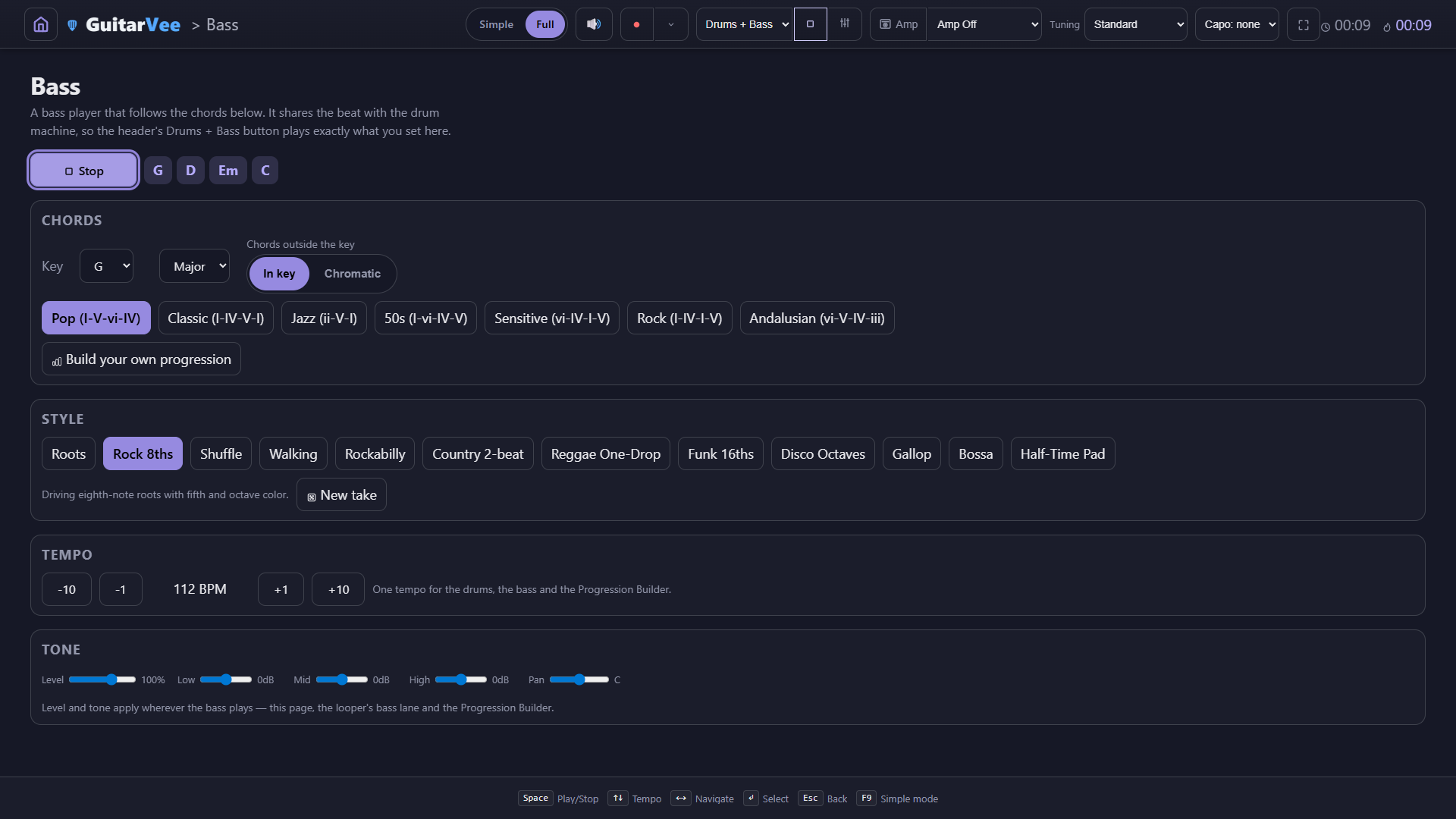
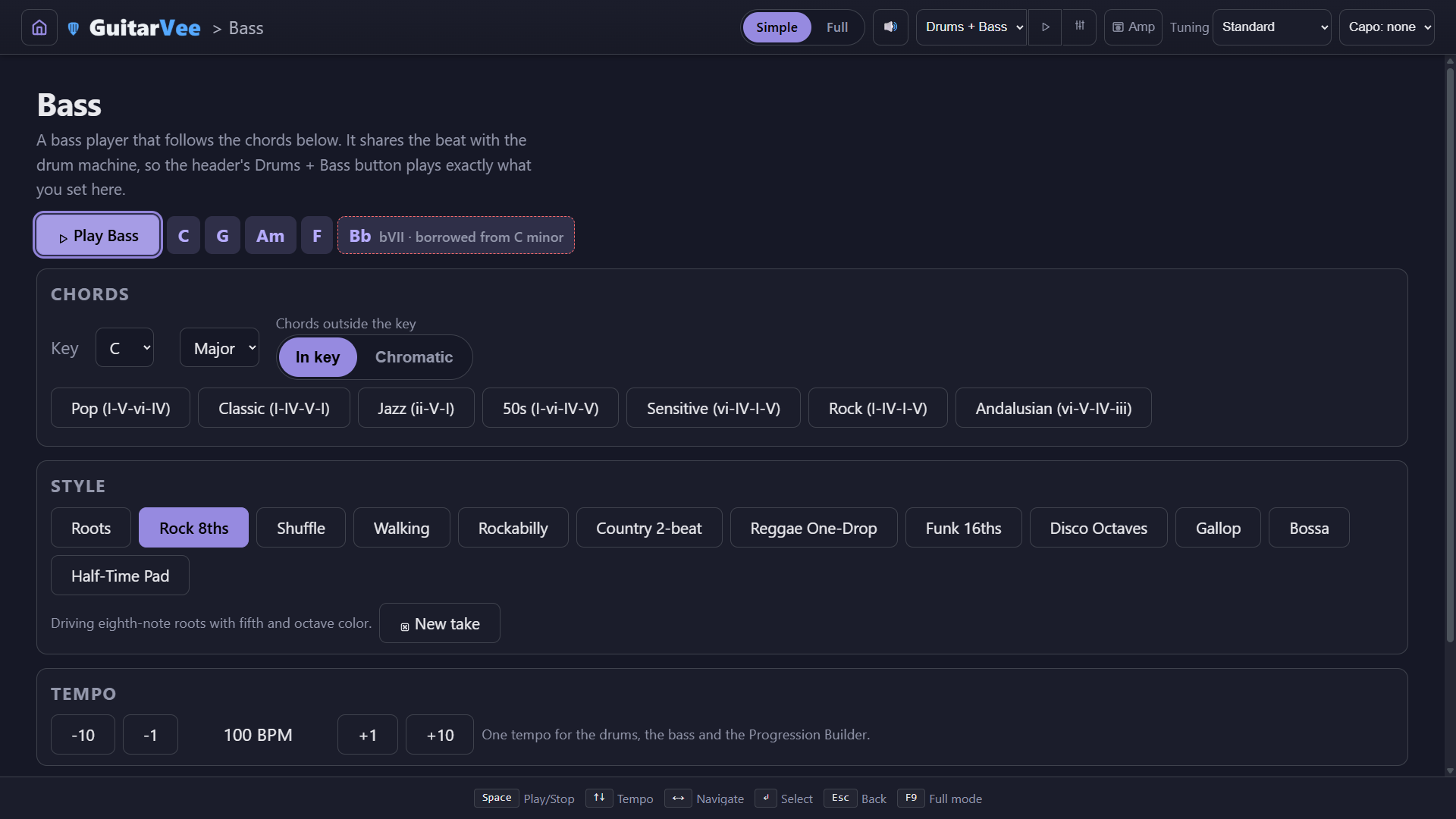
A Bass page of its own — key, Major / Minor, In key or Chromatic, preset progressions, twelve styles, New take, the band's one tempo, and a channel strip: Level, Low, Mid, High, Pan
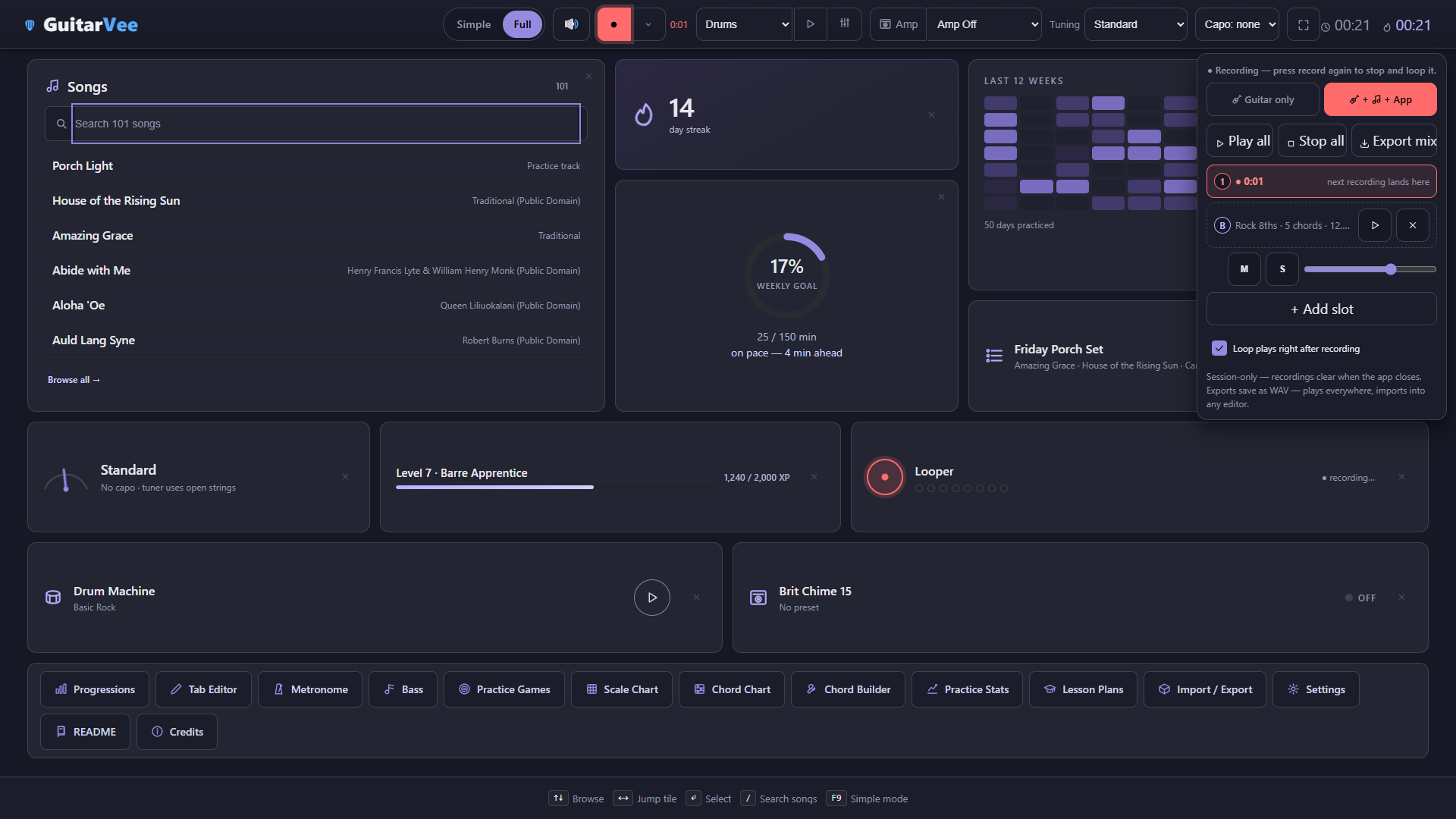
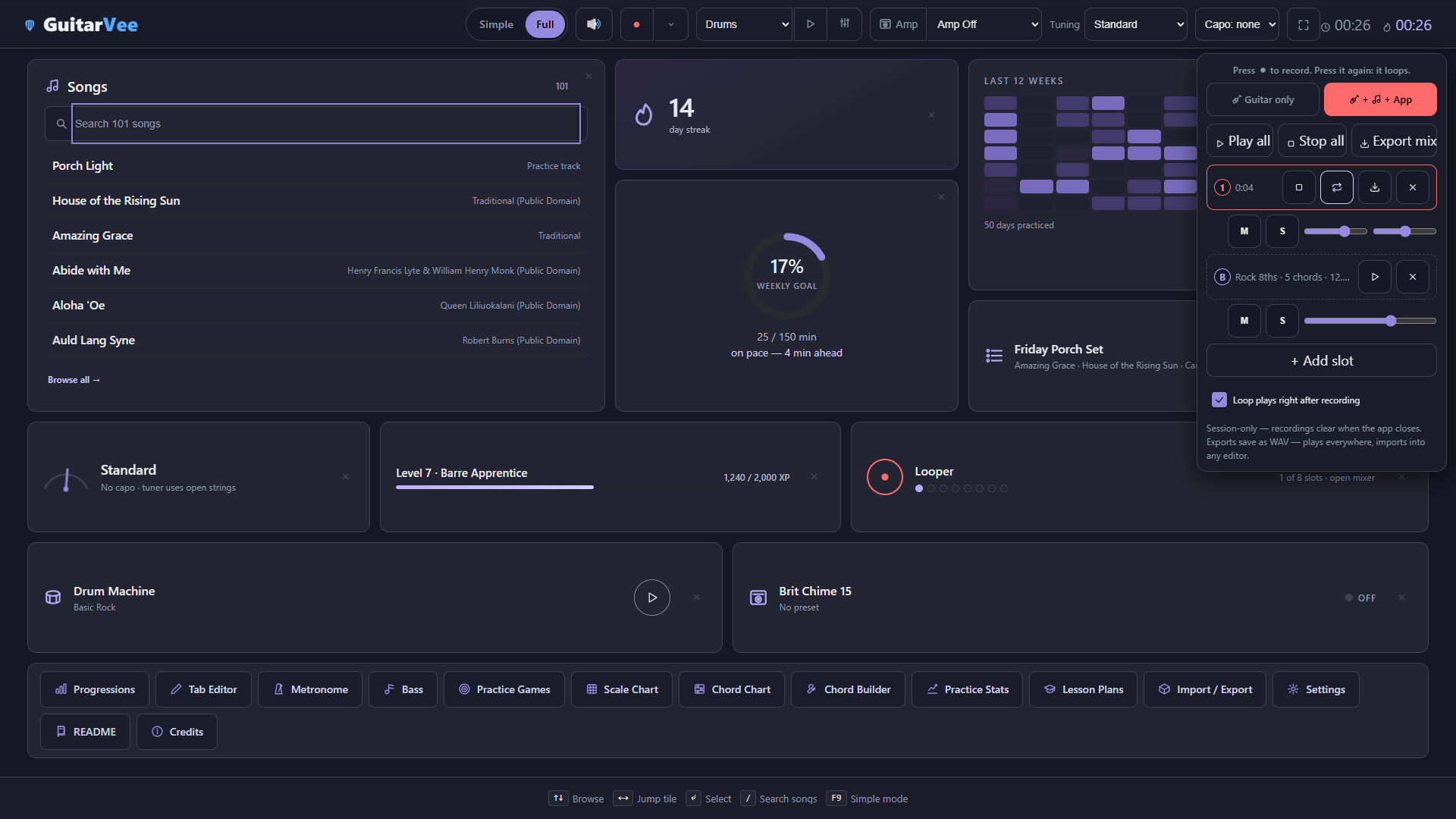
A multitrack looper — eight slots plus the band's bass as its own lane, guitar over the top (or + App to take the drums with you), export the mix to WAV
One sequence — drums, bass, the Progression Builder's chords and the looper all agree on where the bar is; nothing ever plays twice
Record from anywhere — the looper's record button lives on the home screen too
Thirty seconds of the built-in band — drums and a bass line locked to one clock. Every sound is made by the app.
Basic Rock at 112 — steps you can poke, patterns you can save, samples you can replace
The Bass page: chords, style, New take, the band's one tempo, and the channel strip that shapes the bass everywhere it playsDrums + Bass from the header: pick it, press Play, and a groove is going — "Drums and bass playing at 112 BPM"
Learn
Tools that teach while you play.
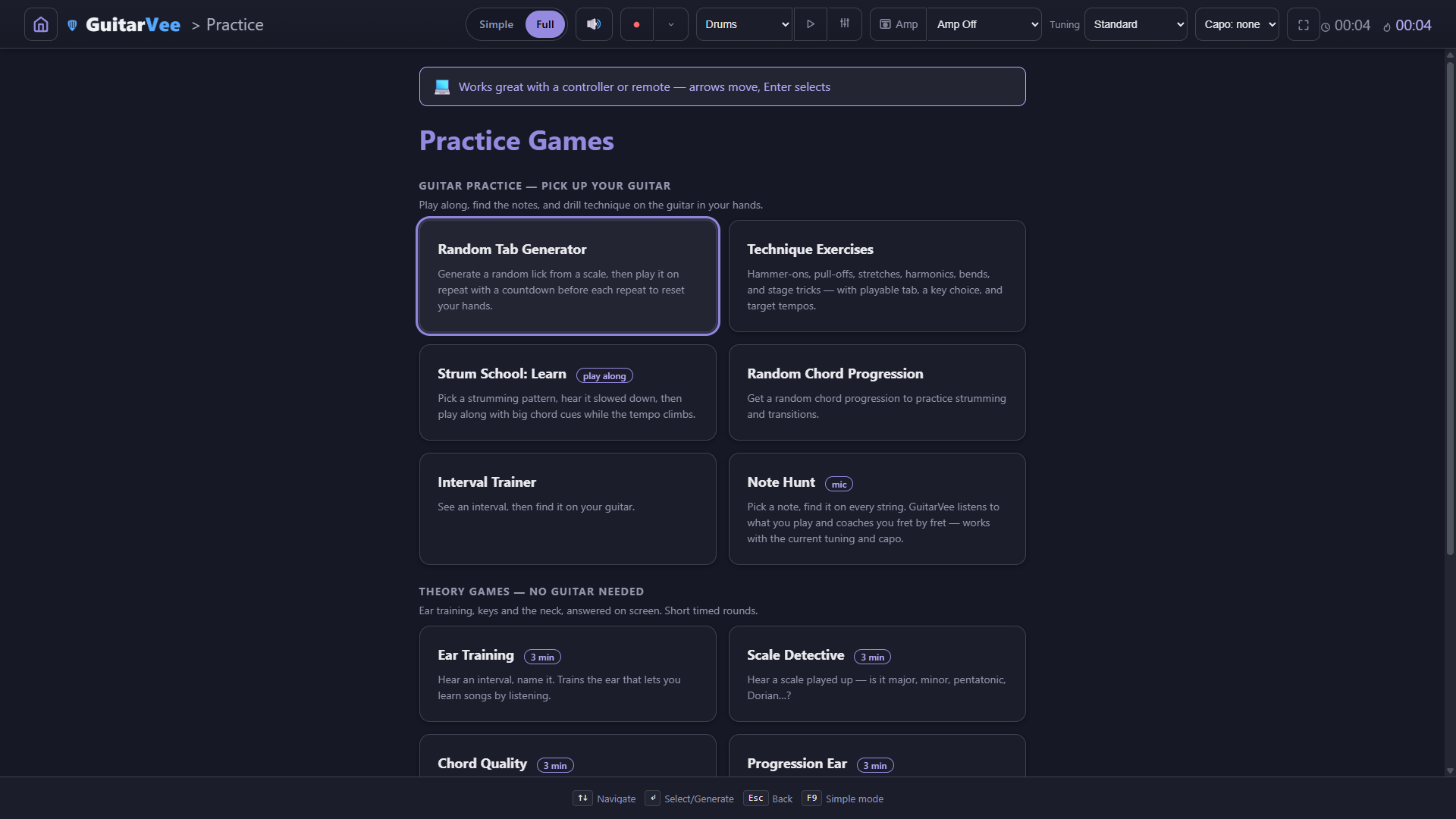
Practice starts with the guitar in your hands: random tabs to read and play, technique drills with playable tab, Strum School's play-along — this chord, then that chord, in time with the drums — and Note Hunt, which listens to your real guitar and coaches you in frets. Then quick theory games where every answer explains itself, right or wrong.
Strum School, Learn — listen, slow it down, then play along: the big chord says what to play now and what's next, while the drums keep time and the tempo climbs.Strum School, the quiz — hear a bar strummed over a real drum groove and name the counts that get up-strums. Wrong answers show the pattern, its counts, and a grid you can replay.
Guitar practice first — random tabs on repeat and technique exercises with playable tab lead the practice menu, ahead of the games you answer on screen
Strum School teaches the strum itself — patterns in tiers, each one a real progression over a real groove; watch the chord cue, change on the beat, let the tempo climb
Note Hunt — it names a note, you find it on the actual guitar in your hands
Seven quick theory games — ear training, chord quality, scale detective, progression ear, circle of fifths, fretboard notes, strum school; 2–3 minute rounds, and wrong answers come with the why
Scale and chord charts, a chord builder — any root, any tuning, any capo; every diagram recomputes
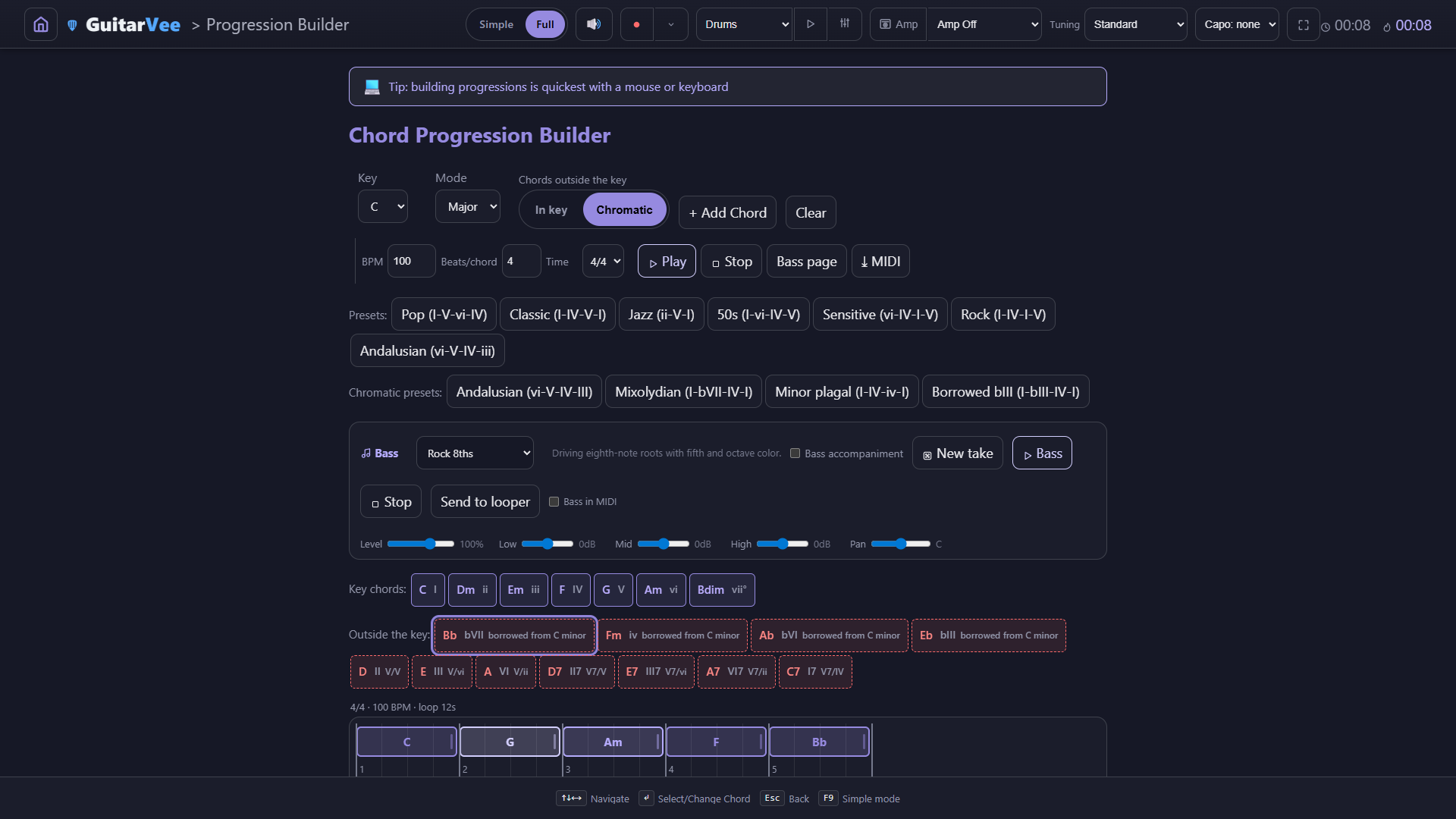
Chords outside the key — an In key | Chromatic switch on the Progression Builder, the Bass page and the Scale Chart; borrowed chords come labelled (Bb as bVII, borrowed from C minor), and flat keys are spelled properly: Eb Ab Bb, never D# G# A#
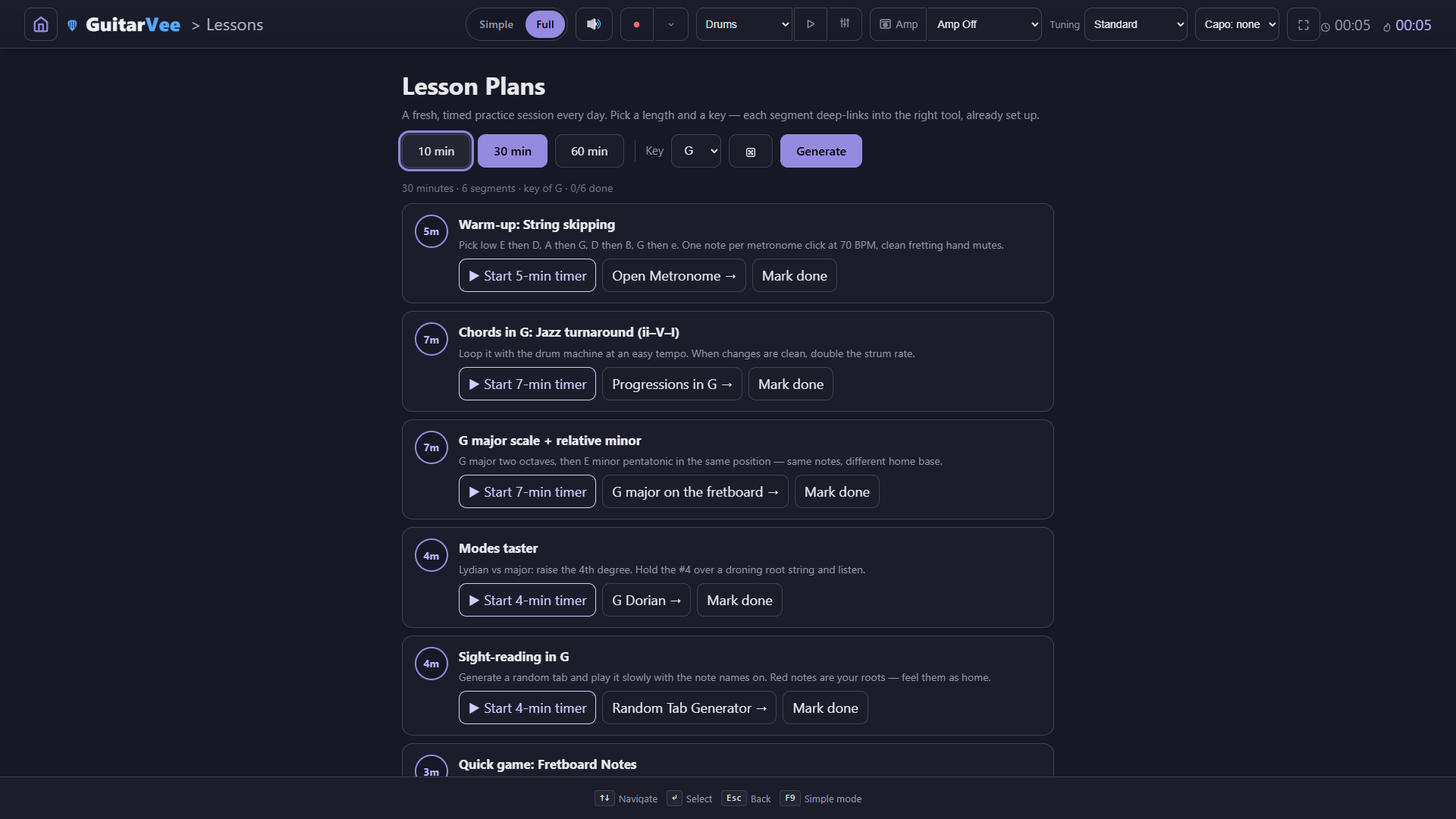
Lesson plans — 10, 30, or 60 minutes, assembled in your key, one tap into the right tool
Ear Training — every answer teaches: the interval in semitones and frets, what it does to a chord, and both notes on the neck, played
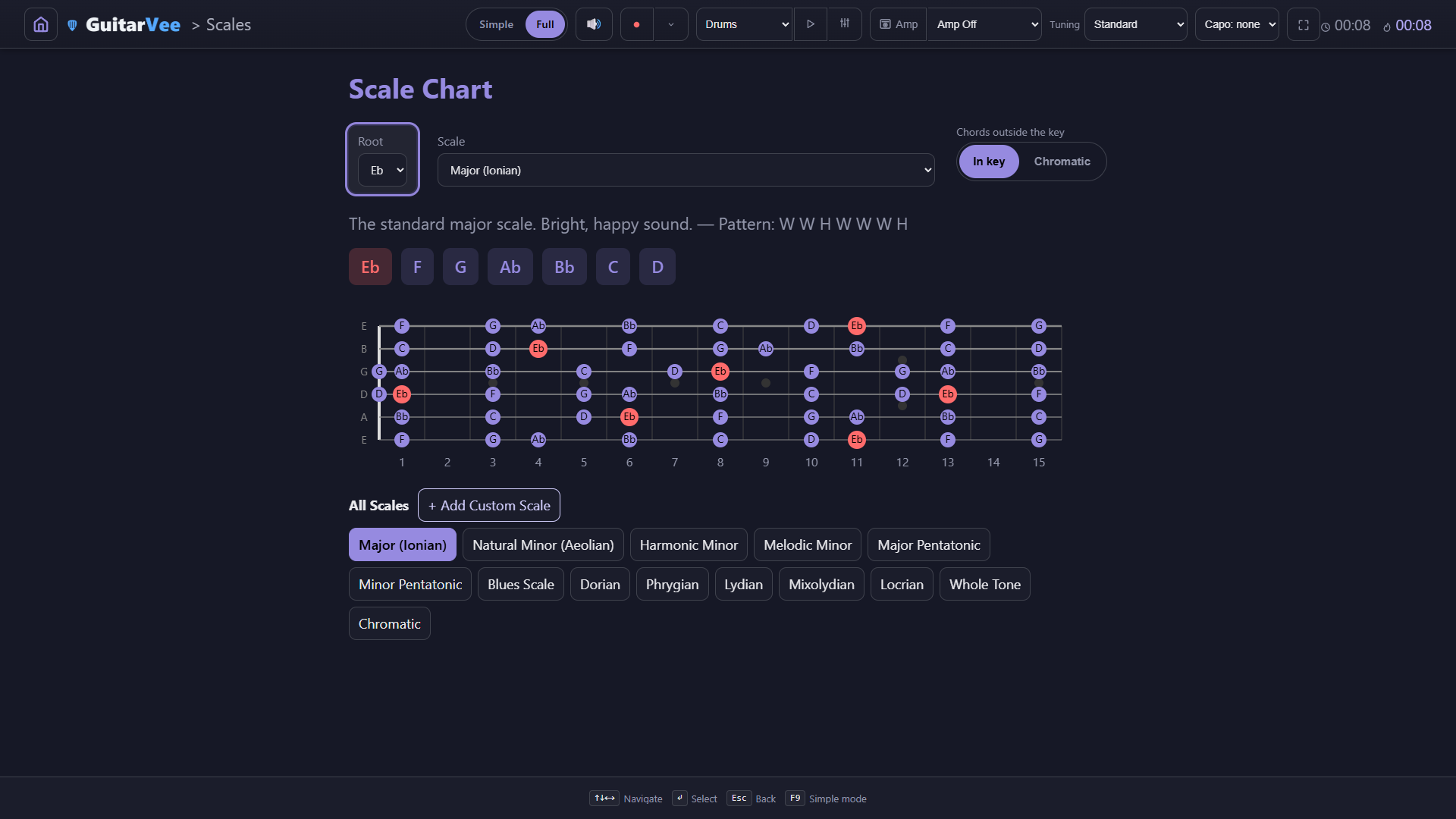
Chromatic scope on: the Outside-the-key row, red borders on borrowed chords, and Bb added to the progression as bVII (borrowed from C minor)Eb major on the Scale Chart, spelled the way a flat key is spelled — Eb, Ab, Bb — with the roots marked across fifteen frets
Simple Mode
Simple is where you start. Full is one toggle away.
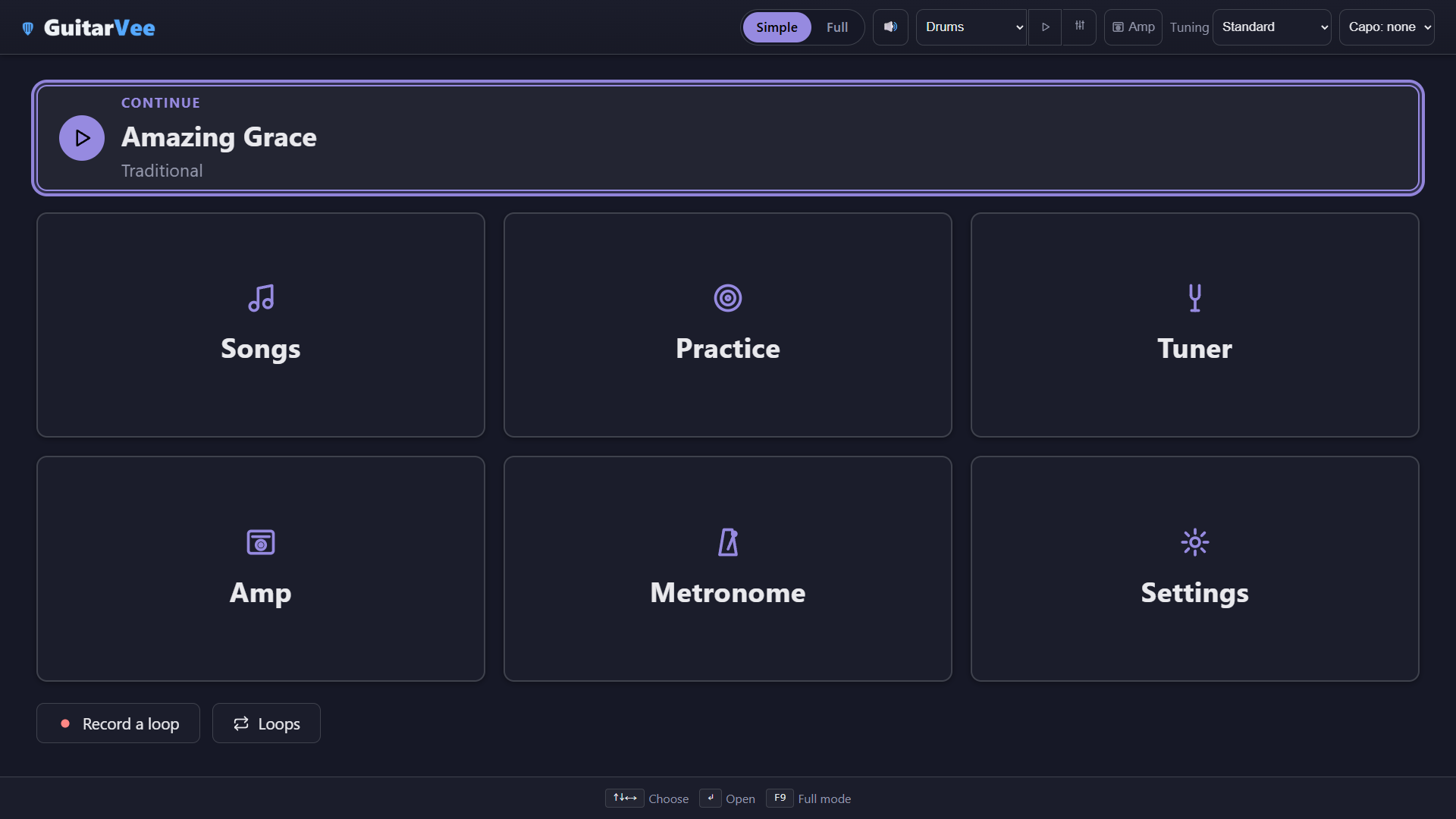
GuitarVee opens in Simple: an uncluttered, defaults-only interface — six big home buttons, a Continue card, bigger type, and the advanced controls tucked away. It's built for students, beginners, and classrooms — a teacher can hand it to a room and know nobody will get lost in the pedal wall. Every screen has the SimpleFull switch in the top bar (or press F9, or use the Interface row at the top of Settings); flip it and everything is there. Whichever you pick sticks, and nothing you set in one mode is lost in the other.
Simple home
A Continue card and six big buttons. Nothing else to read.
Simple performer
Bigger chips, bigger words; the dock keeps play, speed, and chords, and drops the rest.
Simple amp
The amp first: pick a model, press Start Amp or Test Riff, play. The signal path and effect settings stay; the shelf waits until you want it.
Simple bass
Chords, style, New take, tempo and Level — everything that makes the bass an instrument; only the EQ / pan strip and the link into the Progression Builder are tucked away.
One switch, and the app a class can actually use on day one. Who it's for →
The full tour
Every feature, one screenshot each.
Everything in the 0.1.0 alpha (build b062), organized by what you're trying to do. Click any shot to open it full size in a new tab. These are straight captures of the app — nothing mocked up.
Show up, plug in, and the week fills in. Everything here is about making the minutes count and letting you see that they did.
The Scorecard
Streak, twelve-week heatmap, weekly goal ring, tonight's setlist, live tuner / level / looper / drums / amp tiles, and a row of quick-launch chips.
Fold what you don't use
Press the × on any panel and the grid re-packs around it. "Show hidden panels (3)" brings them back; what you fold is remembered.
Practice Stats
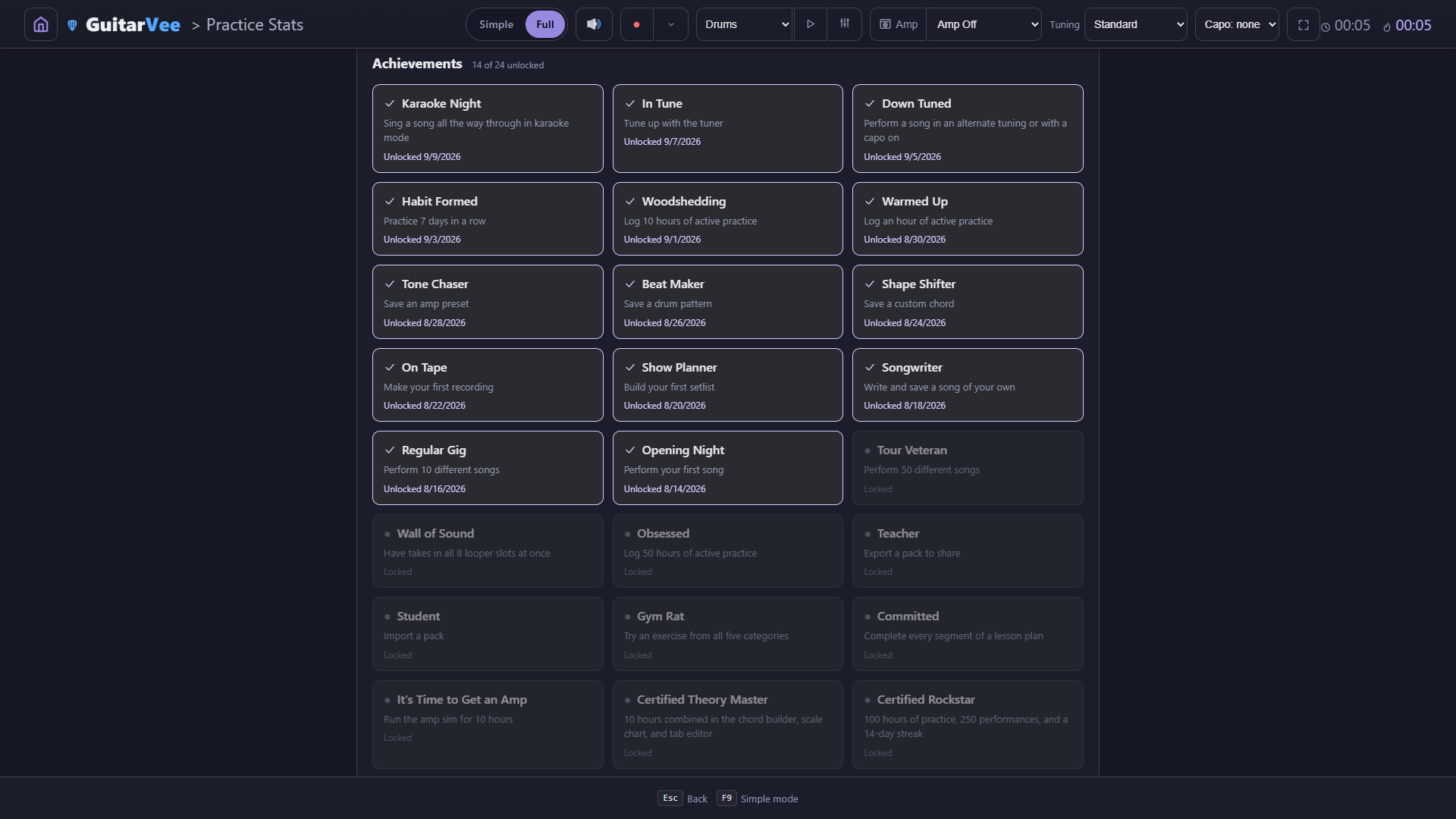
Total time vs. active time (only counted while you're actually doing something), 26 weeks of heat, the last 14 days as bars, achievements underneath.
Achievements
Twenty-five, from Opening Night to Certified Rockstar (one of them is Steam-only). Each one says exactly what unlocks it, and when you did.
Metronome
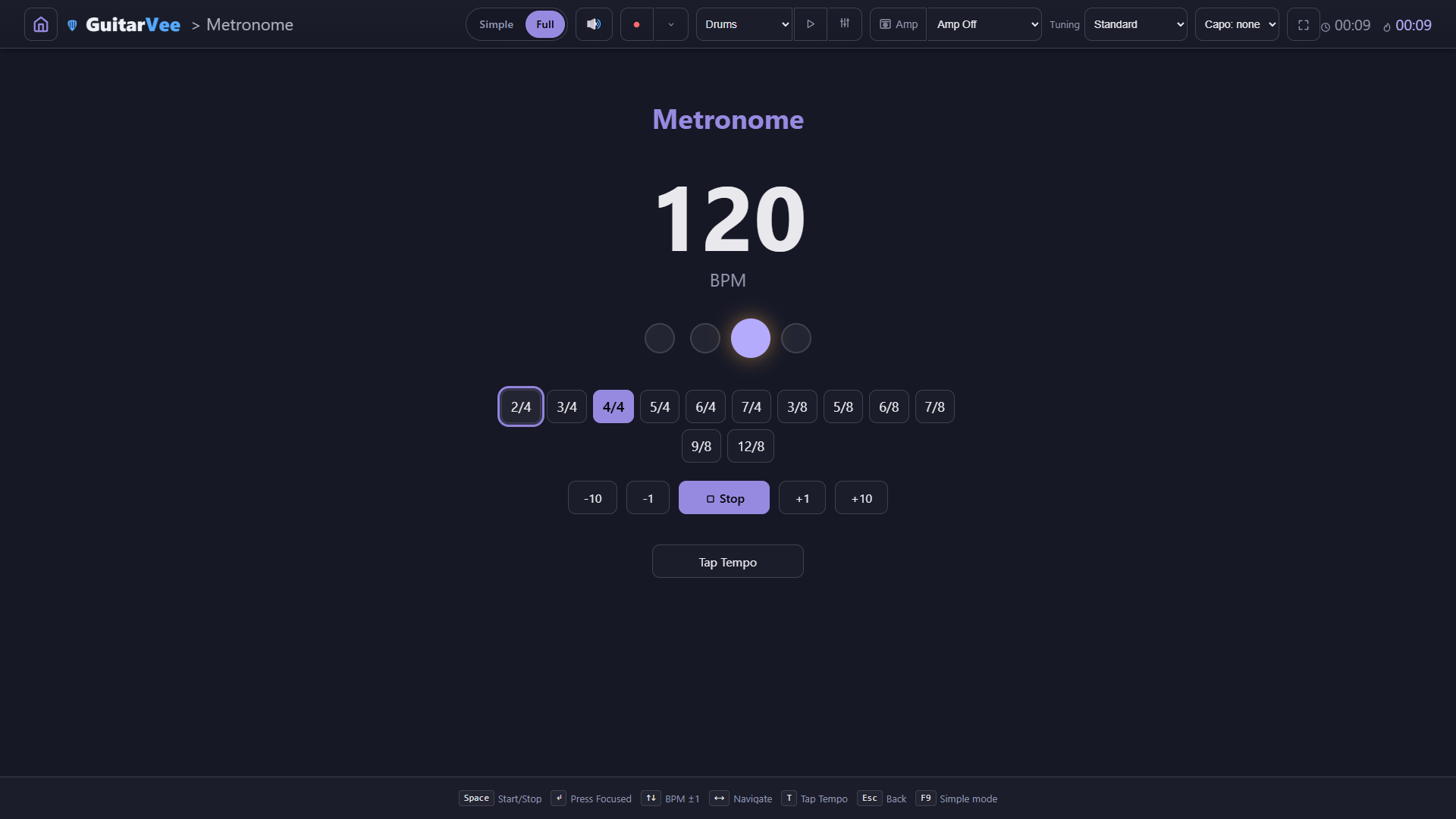
Twelve time signatures from 2/4 to 12/8, tap tempo, ±1 and ±10 nudges, big beat dots you can read from across the room.
Reference Tuner
Reference tones per string in Single, Sustain, or Repeat — or Chromatic mode, which listens and names the note with cents flat or sharp. Any tuning, any capo.
Perform
the sheet, the set, the room
The performer gets out of the way. Two views for the same song, a karaoke mode for the big screen, setlists that run themselves, and songs that set up your guitar.
Flow view + Section Map
Chord chips ride the words they belong to. The Section Map on the right ticks verses for XP; the notes card at the bottom remembers what to fix.
Classic view
Chords over monospace lyrics, the way chord sheets have always looked. One keypress (V) from Flow.
Songs set up your guitar
A chart saved for Drop D, capo 2 switches the header when it opens — "set your guitar" — and Keep mine puts your own setup back while the song stays open.
Perform All
Run a setlist straight through. "Next: House of the Rising Sun (2 of 7)" waits in the corner; N jumps ahead, and each song applies its own tuning and capo as it comes up.
Karaoke
One line at a time, big, with the song's chord diagrams down the right. Space to advance, or let it auto-advance at a pace you save; the Track level row sits the recording beside the band.
The top bar
Simple | Full, master volume, record, the Drums / Drums + Bass loop with Play and a page button, the Amp button and its preset picker, tuning and capo — on every screen. Simple mode keeps the switch, volume, loop, Amp button, tuning and capo. Whatever you press here keeps running while you navigate.
Rig
amps, signal path, pedals, cabs
Modeled on the classic circuits — tone stacks, tube stages, sag, and speaker voicings. The amp comes first on the screen; the signal path reads Guitar in, FRONT, amp, LOOP, Out. Plug into an interface, or run the Test Riff through the same chain.
The amp screen
Amp first: model, faceplate, cab / speaker / mic. Then the signal path with the input and output pickers, then the settings for the selected pedal, then the shelf.
On the bench
The Brit Chime 15 on the Test Riff: knobs that turn, the IN / OUT / SAG meters live, the CLIP lamp waiting — and the signal path with its four pedals right below.
Amp Models
Twelve heads plus the original Custom rig. Pick one and the faceplate, tone stack, and speaker voicing follow.
Cab, speaker, mic
Nine cabinets, seven speaker voicings, and a mic you can back off the grille — right under the head. Here a 4×12 Stack with the Brit 25 voicing.
Guitar in, Out
Pick the input device and its channel — Input 1, or Inputs 1+2 as a stereo pair — pick the output, and choose whether the amp comes back through the audio interface.
The delay readout
While the amp runs, the Out box says what the system currently measures — "Delay: About 51 ms" — so you know what you are playing against.
FRONT and LOOP
Two lanes, read left to right: drives before the amp, delays and reverbs in the loop where their trails stay clean. Every pedal has a button to the other lane; up to ten at once.
Effect settings
Select a pedal in the signal path and its settings appear in one place: power, its knobs, Earlier / Later, Move to the front or the loop, Remove.
The effects shelf
A hundred pedals in Dynamics, Drive, Tone, Modulation, Time, and Weird — plus your own plugin pedals on the last row. Press + and it lands on the board.
Search and tags
Type "verb", tap ambient, and the shelf narrows to the reverbs. Seventeen tags from high-gain to bass-friendly, and Esc clears the lot.
Band
drums, bass, looper — one clock
One sequence, one tempo: whatever joins comes in on the next bar, and Stop anywhere stops the band. The looper records all of it.
Drum Machine
Eighteen patterns from Basic Rock to Tom Fill, a step grid you can poke, save your own, and load your own samples on any channel.
Drums + Bass
Pick Drums + Bass up top and press Play: drums and a bass line start together and keep playing on every page. Stop anywhere stops the band.
The Bass page
Key, Major / Minor, In key or Chromatic, preset progressions, twelve styles, New take for a fresh line, the band's one tempo, and the channel strip: Level, Low, Mid, High, Pan.
Looper, recording
F8 from any screen and slot 1 is live. Guitar only, or + App to take the drums and bass with you; the bass lane you sent from the Progression Builder is already there.
Looper
Eight slots with M / S, volume and pan, the bass lane alongside, Play all, Stop all, export the mix to WAV. It loops the moment you stop.
Learn
games that explain themselves, charts that recompute
Every answer — right or wrong — comes with the why. Strum School trains your ear for patterns and your hand to play them; the charts know which chords are in the key and which are borrowed.
Practice Games
Guitar Practice comes first, played on the guitar: random tabs on repeat with a countdown before each repeat, technique exercises with a key choice for the movable drills, Strum School Learn, chord progressions, the interval trainer, and Note Hunt, which listens. Then Theory Games, answered on screen: Ear Training, Scale Detective, Chord Quality, Progression Ear, Strum School, Circle of Fifths, Fretboard Notes.
Strum School — quiz
Hear a bar strummed over a real drum groove (here Hip Hop at 75, G → C) and name the counts that get up-strums. Space replays it.
Strum School — the answer
Wrong answers explain themselves: the pattern's name, its counts, the progression it lives in, and a grid that lights up as it plays. "Learn this pattern" is one click away.
Strum School — Learn
Listen, slow it down, then play along. The big chord says what to play now and what's next, the drums keep time, and the tempo climbs toward the target. Patterns come in tiers.
Ear Training
Name the interval. Every answer comes with the why — semitones, frets, what it does to a chord — and both notes placed on a fretboard you can hear played.
Note Hunt
It names a note; you find it on each string of the guitar in your hands. It listens through the mic or your interface, coaches you fret by fret, and moves on when you land it.
Progression Builder
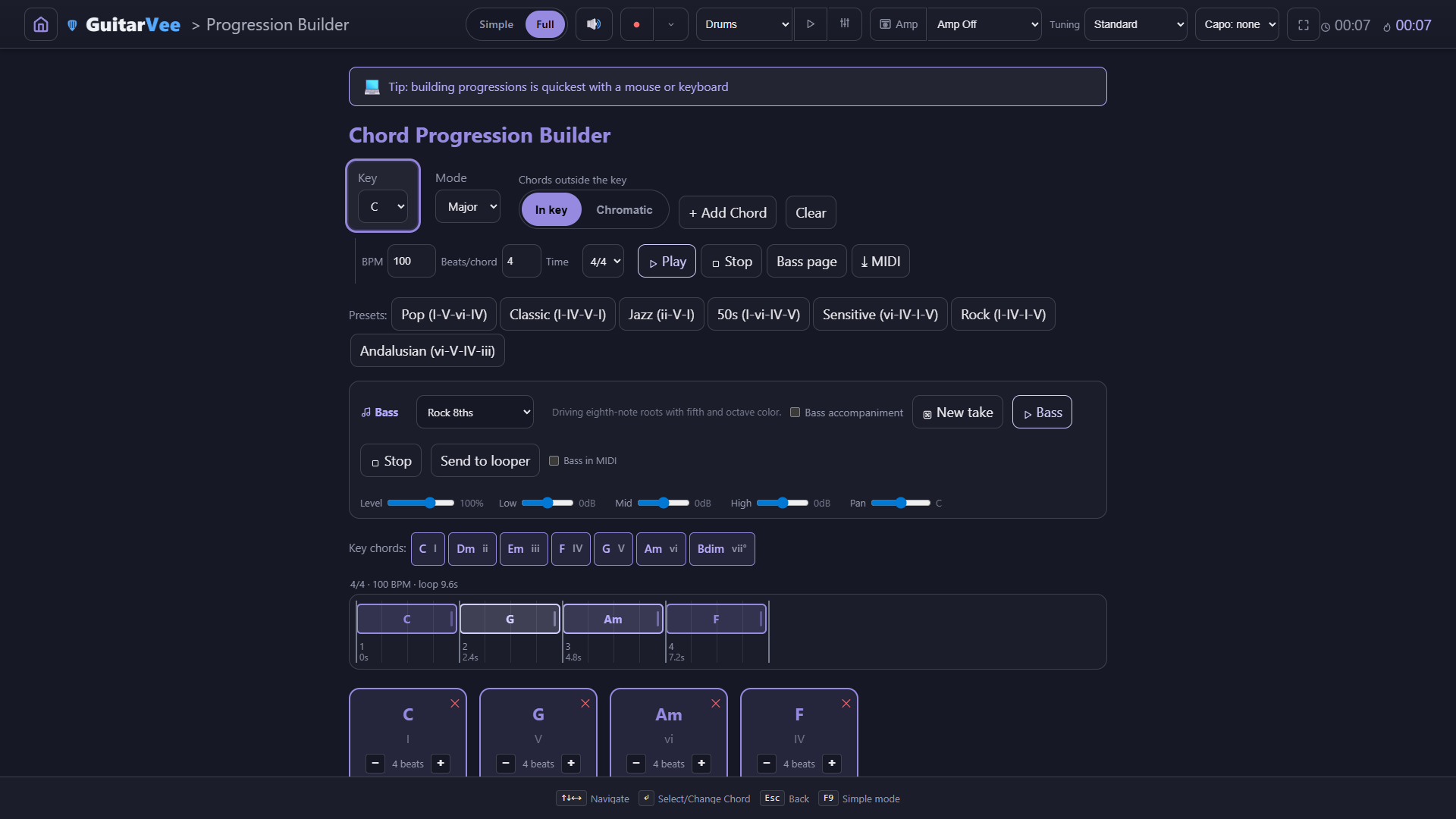
Pick a key and a preset (or build your own), set beats per chord and the time signature, and a bass player in twelve styles follows along. Send it to the looper or export MIDI.
Chords outside the key
Switch to Chromatic and the borrowed chords appear, labelled — Bb as bVII, borrowed from C minor — with red borders so you can see what is outside the key at a glance.
Scale Chart
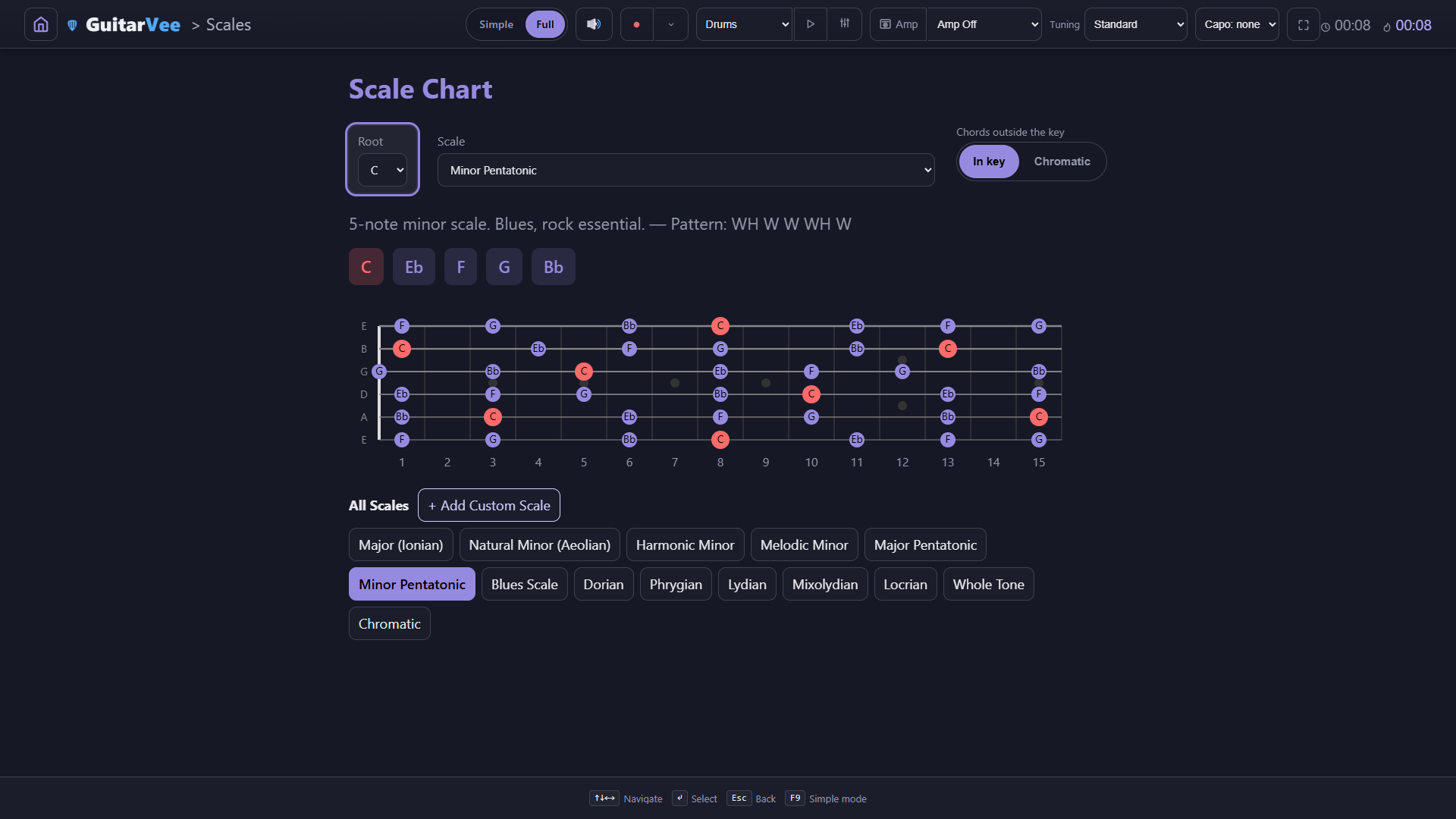
Any root, fourteen scales plus your own, laid across fifteen frets with the roots marked and the interval pattern spelled out.
Spelled properly
Eb major reads Eb, Ab, Bb — never D#, G#, A#. Flat keys are spelled as flat keys on every chart and chord chip.
Chord Chart
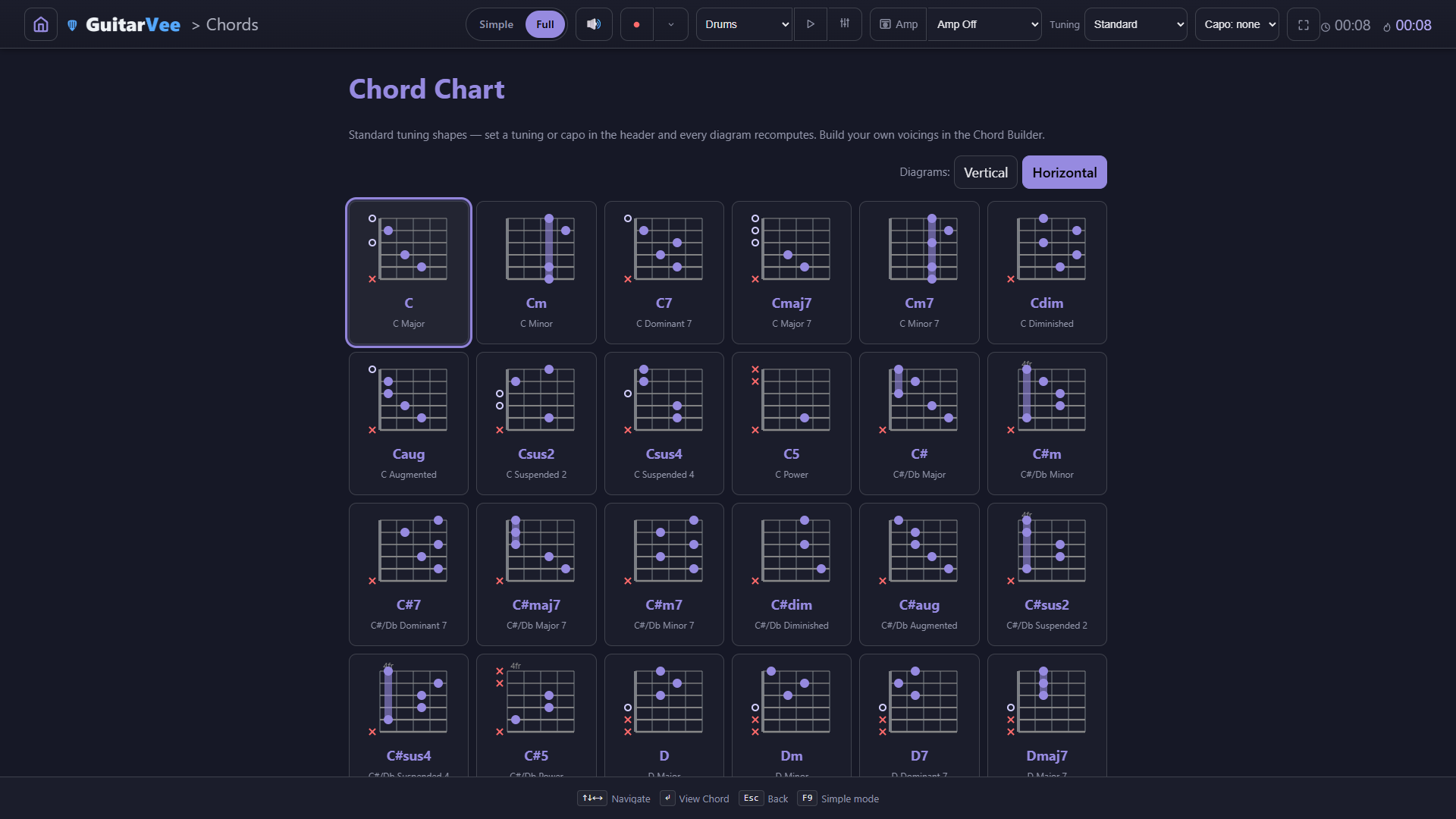
Every quality for every root. Change the tuning or capo in the header and every diagram recomputes — the solver finds playable shapes.
Chord Builder
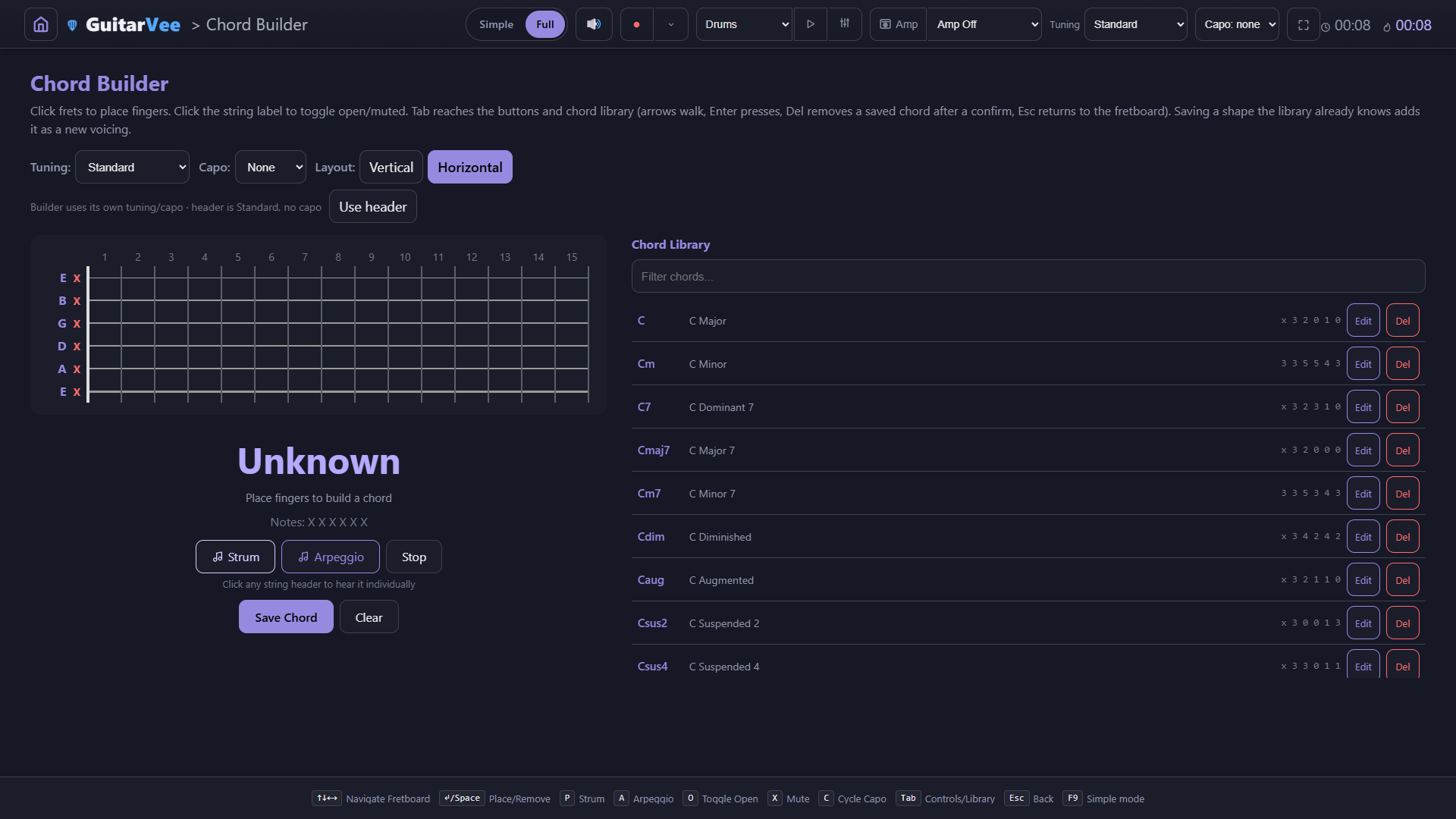
Click frets to place fingers, hear it strummed or arpeggiated, and save your own voicings into the library the rest of the app uses.
Lesson Plans
Pick 10, 30, or 60 minutes and a key. Each timed segment deep-links into the right tool, already set up — the warm-up to the metronome, the turnaround to Progressions in G.
Library & Sharing
songs, setlists, tabs, tracks, packs
A hundred public-domain songs to start with, editors for your own, a player for your own practice tracks, and packs you can hand to a student or a whole class.
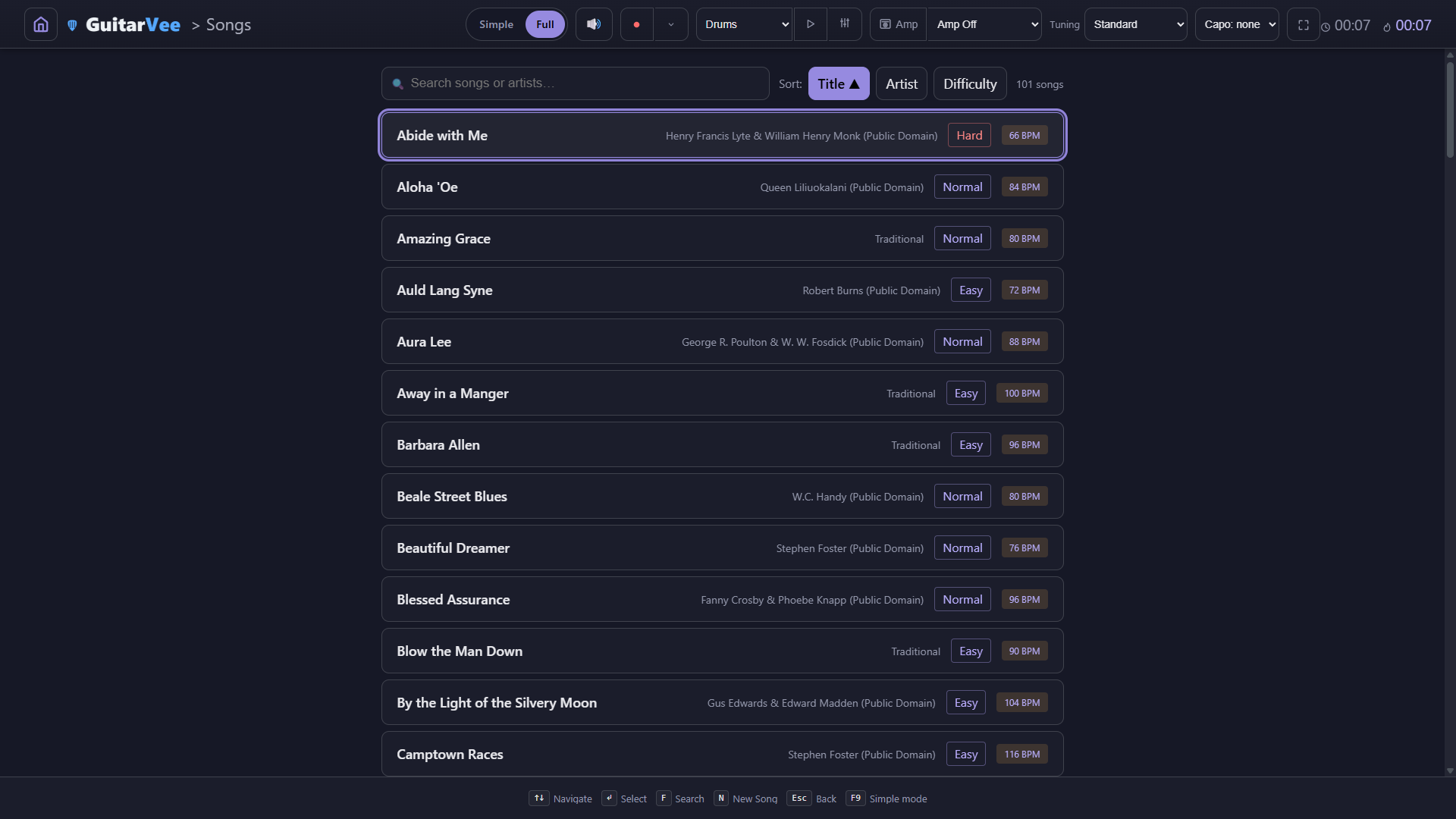
Songs
100 public-domain songs included (plus whatever you add — here a practice track), sortable by title, artist, or difficulty, with the tempo on every row.
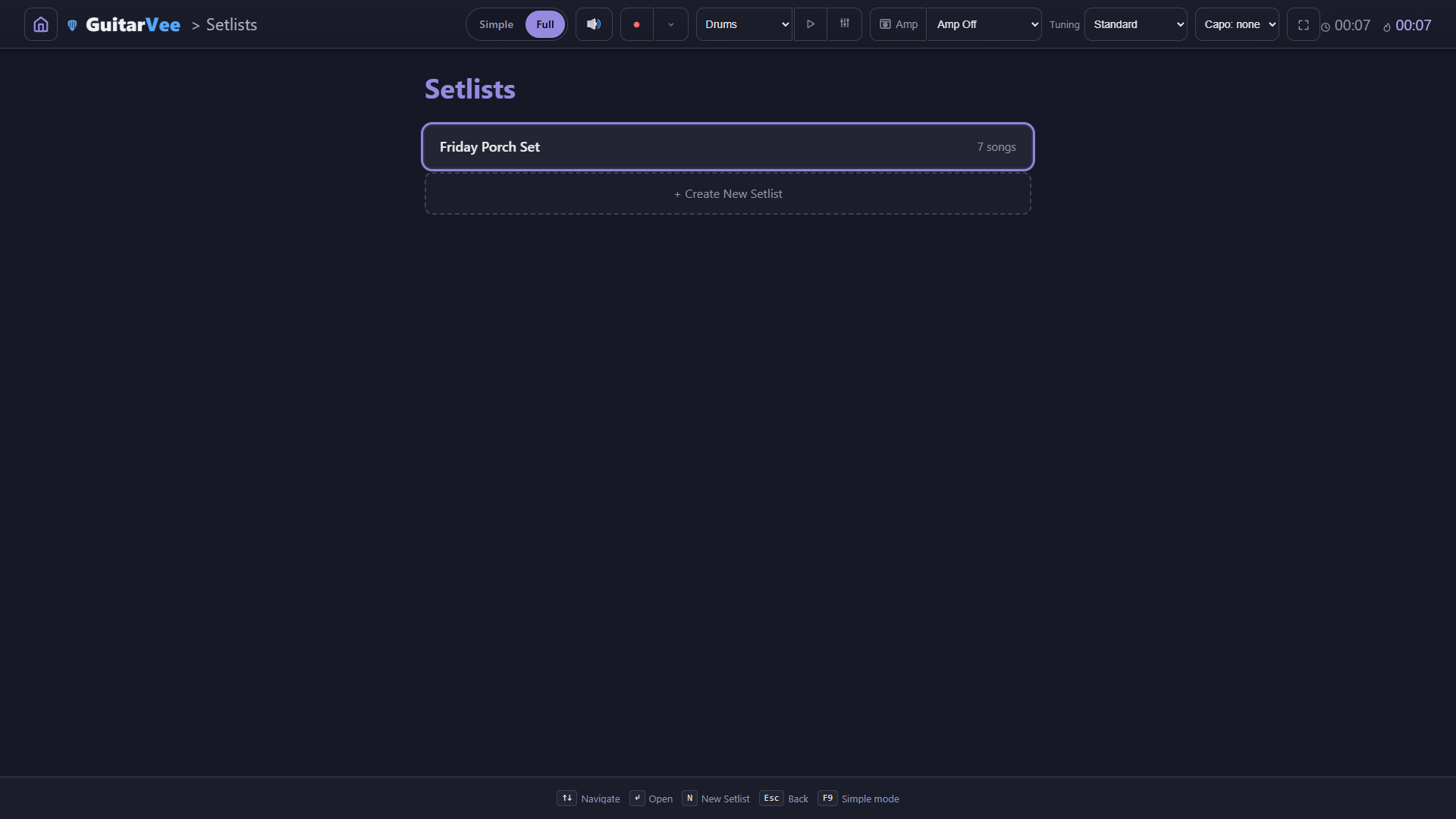
Setlists
Order the set, see the tempos, Perform All, or export the whole thing to PDF for the music stand. Each song brings its own tuning and capo as it comes up.
Audio Player
Give a song an audio file and it gets section markers you can loop, and a Track level — 100% is the house level, the same as the drums and bass, so a track sits beside the band.
Song Editor
Title, artist, BPM, scroll speed, time signature, difficulty, tuning, capo — then the lyrics with chords. Tab moves between fields; Ctrl+S saves.
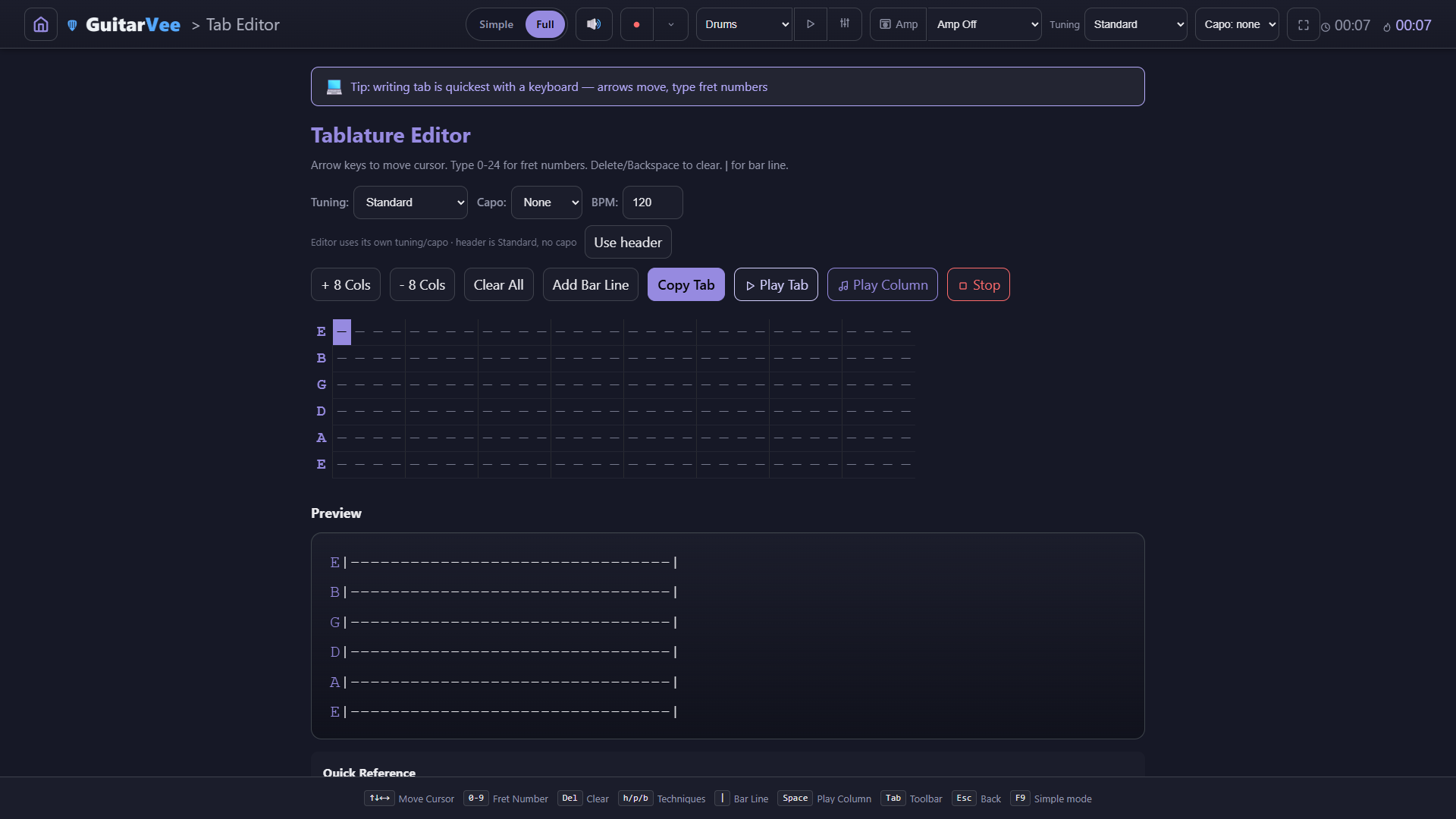
Tab Editor
Arrow keys move, type fret numbers, add bar lines, hear the tab (or one column) played back, and copy it out as plain text.
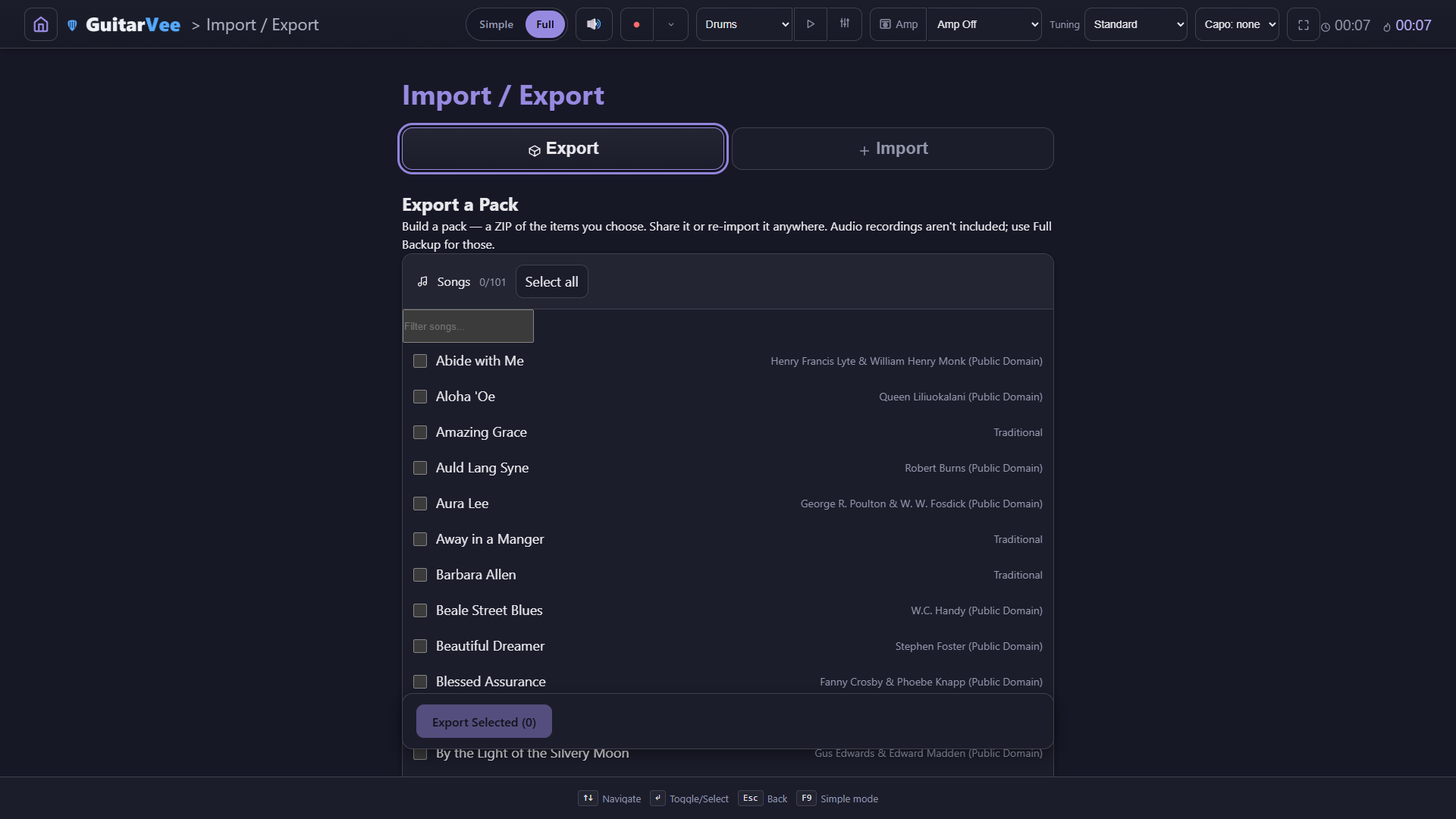
Import / Export
Build a pack — a ZIP of the items you choose — and share it or re-import it anywhere. A teacher's setlist and chord library can reach the whole class in one file.
Comfort
themes, controller, settings, Simple mode
It should feel good to leave open. Themes for any room, controls for any input, and a Simple mode when the room is a classroom.
Themes
Dozens of them — core, grays, colors and moods, sports colors, and holiday themes that switch on by the calendar. Auto (Day/Night) flips light and dark on a schedule.
Light theme
The same Scorecard in daylight — for the bright practice room, the projector, or just a preference.
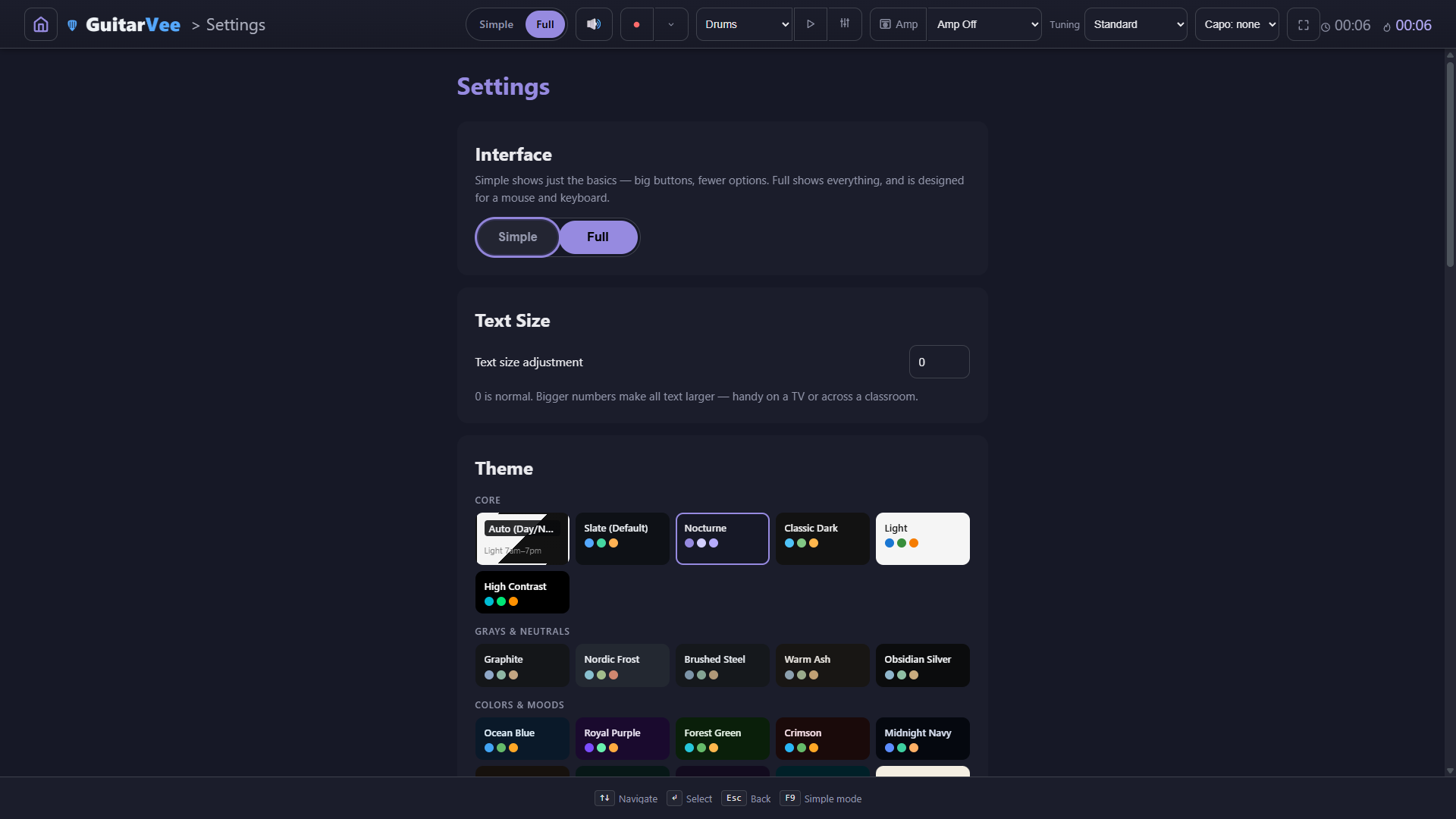
Interface and text size
The Simple | Full switch lives at the top of Settings too, with Text Size right under it — bigger numbers make all text larger, handy on a TV or across a classroom.
Controller
Plug in a gamepad and the badge lights: D-pad or stick to navigate, A to select, B back, Y for the chord panel, bumpers for the loop points. Auto by default; Always on or Off in Settings.
Amp voicing
Current, or the Previous voicing the high-gain amps had before the rework. A pick applies right away; if the amp is on, it restarts so you hear the change.
Credits
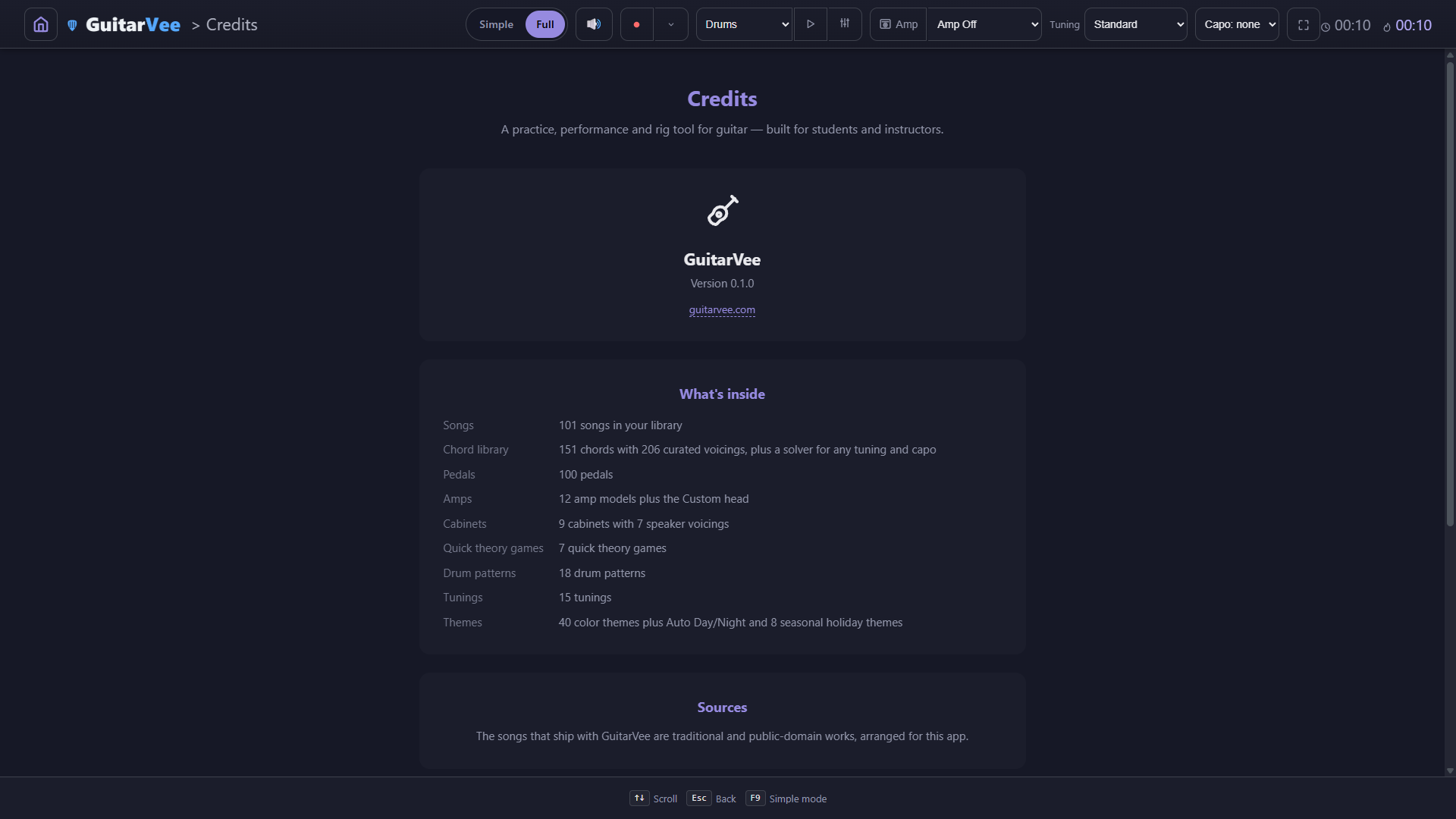
A plain product page: the name, the version, the website, and the "What's inside" counts — songs, chords and voicings, pedals, amps, cabinets, games, patterns, tunings, themes.
Simple mode
GuitarVee starts here. One toggle in the top bar (or F9) brings the Full interface; one more brings this back. See the Simple screens ↑
Keyboard, mouse, touch, or controller
Every screen shows its own key hints along the bottom — you can see them in every shot on this page. A gamepad is bridged to the same keys, so the whole app is reachable from a couch.
Under SteamOS on a Steam Machine or in Big Picture, the controller bridge turns itself on — the Steam Machine build is experimental, and Windows is the full experience
Text size and Simple mode scale the type for TVs and small screens
Everything works offline — the amp room, the games, the lesson plans
Downloads
Every version, kept here.
Every release stays on the download page — grab the newest, or stay on the one your class started the term on. Nothing here will update you off a version you like. Copies from Steam and other platforms update through their own stores; version-locking is a website thing.
VersionDateSizeSHA-256
0.1.0 alphabuild b062 · Windows 64-bit · current22 September 20263,645,915 bytes about 3.5 MBdb05fd0d040f10aa1f6fc80c863f0dc30c88dbe9395647a43cd38a5762bda8bcDownload
0.1.0 alphabuild b061 · Windows 64-bit · previous build22 September 20263,645,483 bytes about 3.5 MBf1a06b1c33fe0631e21f6458e24c5d2ad8d63fe52c3e458b53f74f0ef5b97095Download
0.1.0 alphabuild b060 · Windows 64-bit · earlier build22 September 20263,645,406 bytes about 3.5 MB1ea155fa7750861e6ae6b605b07ddac8bef6733223c1e9eb5c38ff60152748faDownload
0.1.0 alphabuild b059 · Windows 64-bit · earlier build18 September 20263,626,282 bytes about 3.5 MB60da7ad208bb09605e113717fe43b92f19b6538c4348529f7b1f3cc7271e93d3Download
0.1.0 alphabuild b058 · Windows 64-bit · earlier build18 September 20263,625,839 bytes about 3.5 MB9c82d98b2e135a2d30170a5633fe373a1ada426a5c2020316e7727cead1b9148Download
0.1.0 alphabuild b057 · Windows 64-bit · earlier build14 September 20263,603,523 bytes about 3.4 MB28e409760e106924bbacbfcf7b0452ec1dbcaba0c81c8fe2edf1a4c5f66b8b7bDownload
0.1.0 alphabuild b056 · Windows 64-bit · earlier build13 September 20263,603,478 bytes about 3.4 MB22ae39daf0adcc33667f62cd6d821778b4ec204d3298c7b65263895cd3408adcDownload
0.1.0 alphabuild b055 · Windows 64-bit · earlier build13 September 20263,603,417 bytes about 3.4 MBef257c4db7a83398adba853a125770b8b1e2b5efcdaaab1c6b61425346eaf0d0Download
0.1.0 alphabuild b053 · Windows 64-bit · earlier build13 September 20263,590,520 bytes about 3.4 MB97a918d195e28fef68bfaebed5a52653eb3e09b3c12b3b37ae5f2c587ce7daebDownload
0.1.0 alphabuild b051 · Windows 64-bit · earlier build12 September 20263,581,056 bytes about 3.4 MBe3ed198415b41bdbbd8590dae49669999aa00af2aacc73ecb7988baf72082840Download
0.1.0 alphabuild b045 · Windows 64-bit · earlier build11 September 20263,565,249 bytes about 3.4 MB9f1770af93c55422e0ff3154c9538490c3648c1ba465657633168c9326e306edDownload
0.1.0 alphabuild b036 · Windows 64-bit · first public build9 September 20263,355,401 bytes about 3.2 MB8f1251762ae0edfda29e5da0f9ea6099d6ec198531e0cdacb754986b0999decfDownload
Every build stays here — nothing gets taken down. Notes for each build are on the download page.
Alpha means alpha: it's playable end to end, and it will have rough edges. Release notes will say what changed and what's known-broken, in plain language. If something looks wrong, please report it.